


- Joined
- Sep 2025
- Subscription
- Free
Admissions profile
Discussions

Hi there,
I'm really sorry for the inconvenience. I’ve sent you an email to help with this issue. Please let me know if you didn't receive it or if you have any other concerns.
Hi @emilyettang198-1, I'm sorry about that. I responded to your email to help you further with this. Please let me know if you didn't receive it or if you have any additional concerns.
Hey there,
You can find the free diagnostic test (or PrepTest June 2007) here: https://classic.7sage.com/preptests/, then look for "PTJ07" using the search box under the "Current (with Logic Games)" tab. See the sample screenshot below:

Let me know if you have any questions!
Hi there,
I'm sorry for the trouble. I reached out to you via email to help you further. Let me know if you didn't receive it or if you have any additional questions. I'm here for you!
Hey there,
I'm so sorry about that.
If you're trying to print out PTs 101–158, which are reformatted PTs, you'll need to switch the version of your PrepTest or Drill page to "Current (with Logic Games)" first. Then, navigate to the Advanced Builder drill, locate the sections equivalent to PTs 101–158, and print those sections.
You can use this table as a guideline: Mapping old sections to new
Feel free to reach out if you're still having trouble. I'm here to assist you!
Hey @casti412627,
The scholarship is not on a rolling basis and we're accepting applications until July 1, 2024, so you still have time! 😉
@luwam171401 said:
Hi- I have a similar problem I purchased LawHub through 7sage but I am unable to access my LawHub advantage subscription. Every time I log into my LawHub account it it asks me to upgrade. Please let me know how I can solve this issue!
Hey @luwam171401,
My apologies for this. I sent you an email to help you further. Let me know if you didn't receive it or if you have any additional questions.
@avaqyteza695 said:
Hello, I'm just writing to ask if my application for the scholarship went through. I have yet to receive an email confirmation! Thank you.
Hey @avaqyteza695,
I can confirm that we received your application for the scholarship and my apologies if you didn't receive an email confirmation.
Feel free to let me know if you have any further questions!
@dianaochoa44 said:
@marynuez206 said:
@njtnoleta213, I'm so sorry about that!
Currently, the tests in the August 2024 format (PTs 101–158) are not available for download. The print PDF option is only available for old tests (PTs 1-94).
In the meantime, to print out PTs 101–158, which are reformatted PTs, you'll need to switch the version of your PrepTest or Drill page to "Current (with Logic Games)." Then, navigate to the Advanced Builder drill, locate the sections equivalent to PTs 101–158, and print those sections.
You can use this table as a guideline: https://docs.google.com/spreadsheets/d/1sczox8uJgD6yFSIkgr9q8ode0hhNtoMItFeBb3WkbTE/edit#gid=0
Let us know if you have any further questions. We're here to help! 😊
Do we have an estimate on when this will be remedied?
Hey @dianaochoa44,
At this time, we can't provide a specific ETA on when this will be available. Our team is diligently working to ensure each feature meets our high standards for quality and user experience, which means development times may vary.
We appreciate your patience—it means a lot to us—and don't hesitate to reach out if you have any additional questions!
Hey there,
You can print any PrepTest/Drill by tapping on the "Printable" button in the Digital Tester. The password for the PDF is your 7Sage account email address. See the screenshot below:

Once the PDF file has loaded, you can either save it first or print it. Here are the steps to do it:
Open the PDF with Google Chrome.
You will be prompted to enter the password for the file. As mentioned before, the password for the PDFs is your 7Sage account email address.
Click on the "Print" icon in the top right corner.
Choose "Save as PDF" next to save it on your computer. After that, you should be able to open, upload, and print a physical copy of without restriction.
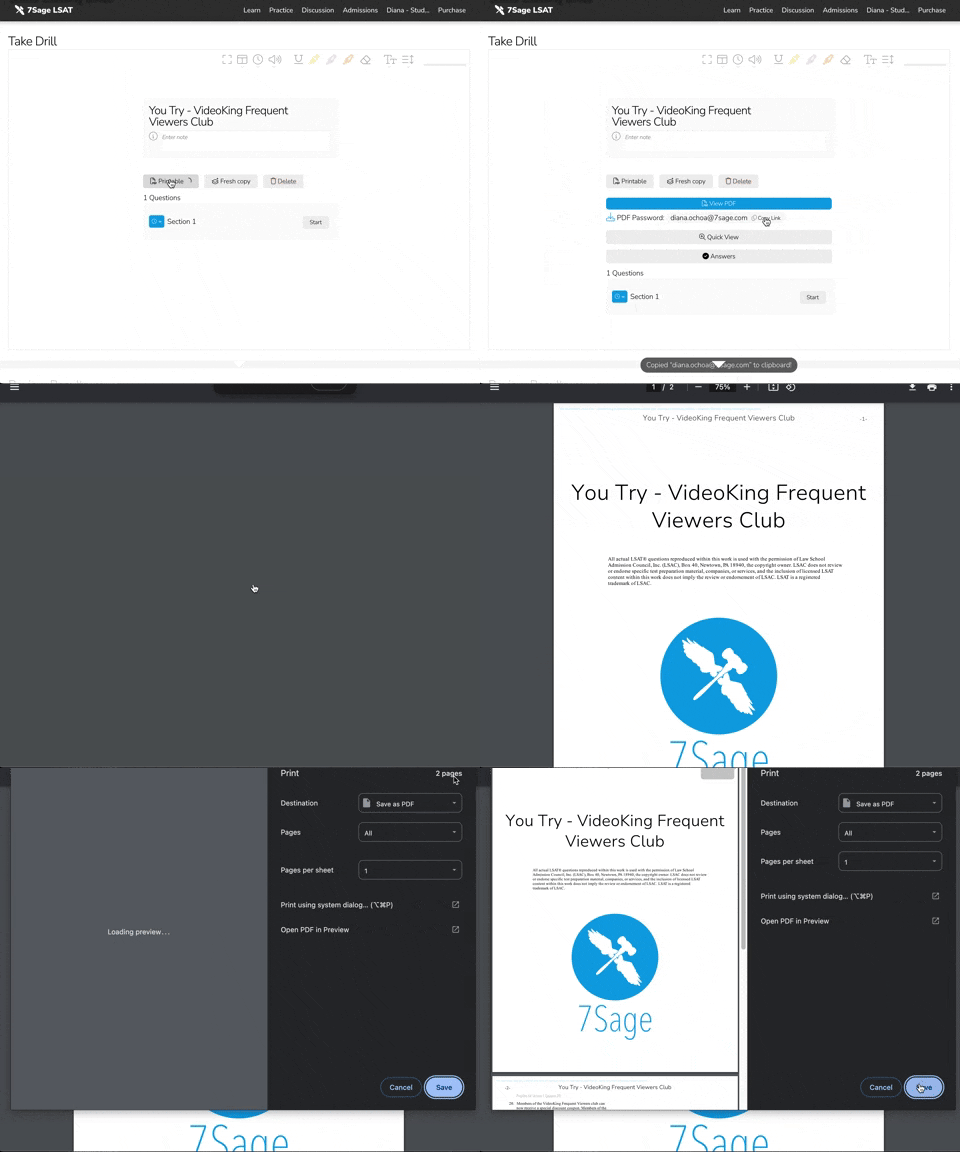
I hope this helps but let me know if you have any additional questions.
Hey @dianaochoa44, I sent you an email to help you further. Let me know if you didn't receive it!
Hey @kevin239-1 I'm sorry about this. I reached out to via direct message to help you further. Let me know if you didn't receive it or if you have any additional concerns.
Hey @alecwahl0829-1,
I'm sorry about this. I reached out to via direct message to help you further. Let me know if you didn't receive it or if you have any additional concerns.
@gurjastar1706 said:
the same thing happened to me too!!
Hey there,
I'm sorry for the trouble. I reached out to you via email to help you further. Let me know if you didn't receive it or if you have any further questions.
Hey there,
I'm so sorry about the trouble.
If you have the "August 2024 and later" tab active on your PrepTests page, you'll need to switch your active tab to "Current (With Logic Games)".

The "Printable" button should now show up on the digital tester.
I hope this helps! Let me know how it goes. I'm here for you!
Hey there,
I'm so sorry about this but I'm afraid the August 2024-formatted PTs (PT 101-158) are currently not available for download or printing.
However, there's a workaround for this in the meantime—to download or print these reformatted PrepTests, you'll need to switch your active tab from "August 2024 and later" to "Current (With Logic Games)" on the PrepTests page.
Then, navigate to the Drills page and use the Advanced Builder mode, locate the sections equivalent to PTs 101–158, and print those sections.
You can use this table as a guideline: Mapping old sections to new
Let me know if you have any further questions. I'm here to help!
Hey @dianaochoa44, could you provide any additional information about the question that you're having trouble with? You can use this format for posting questions about specific Reading Comprehension (RC) questions:
"PT#.S#.Q# (P#) - brief description of stimulus" E.g. PT60.S1.Q7 (P4) - weakened immune system cancer
Hey there,
If you're using MacOS, there's no way to remove the encryption via Preview. However, there's a workaround if you use Chrome to view and save the PDF. Here's how to do it:
Open the restricted PDF with Google Chrome.
You will be prompted to enter the password for the file. This is your 7Sage email address.
Click on the "Print" icon in the top right corner.
Choose "Save as PDF" next to save it on your computer. After that, you should be able to open, annotate and print the document as usual.
Please see my sample GIF below:

Let me know how it goes! I'm here to help.
@amruthapalaniyappan619 I've also responded to your inquiry. Please don't hesitate to let me know if you didn't receive it or if you have any further concerns.
@hernerika19146 and @jbkr98221, my apologies for this. I've responded to you via email regarding the issue. Please let me know if you didn't receive my email or if you have any questions.
My apologies for this. I've sent you both a message via direct messaging for further assistance. Please feel free to let me know if you haven't received it or if you have any questions. I'm here to help!
Hi @hernerika19146, I am sorry for this. I've sent you a response via direct messaging. Please let me know if you have not received it or if you have any further questions. I'm here to help.
Hi @reneemac980, I'm afraid the screenshots are dated but here's how you can do it and how it looks like now.
You can view all your pinned questions on the Analytics page. To view your pinned questions, first tap on the Question Table at the top of the Analytics page, then on the "pin" icon. See the screenshot below:
You can also filter your pinned questions in the Drill Question Bank by selecting the Logical Reasoning section and then typing "+pin" in the filter box. See the screenshot below:
I hope this helps! Let me know if you have any other questions.
Hi @dianaochoa44, the Study Schedule follows the Core Curriculum (or Syllabus) in order. The drills are usually located after the lessons in a section and before the problem sets. See the sample screenshot below:

We generally recommend that students work through the Core Curriculum in order. However, you can choose which Lessons you wish to focus on by tapping on that Lesson title or you can directly skip those you already know and do drills.
You can always take the Drills as long as you feel ready. The course is self-paced so you can choose how you would like to study.
I hope this helps! Feel free to let me know if you have any further questions.
Hey @ananewport446, we recommend that you do not post your email or phone number publicly. Spam bots might pick up your email & number and you'll get spam. If you want to share contact info, you can use a private message. I went ahead and removed your email from your post. You can see our Forum Rules here.