
Self-study

I had the star option and the completed option on the left hand side of each lesson, however, it suddenly disappeared. Could anyone tell me how to bring it back as I am very lost on my progress and lessons I want to come back to.
1
7 comments
Hi @melissaindaa471-1-1-1, @melissaindaa471, @marvinkw87539, @melissaindaa471, @melissaindaa471.indaa, @frazeejeremy532,
I'm so sorry for the trouble! I tried to recreate the problem on my end but was not able to. I was able to see the check marks and the starred lessons in the Syllabus. See the GIF below:
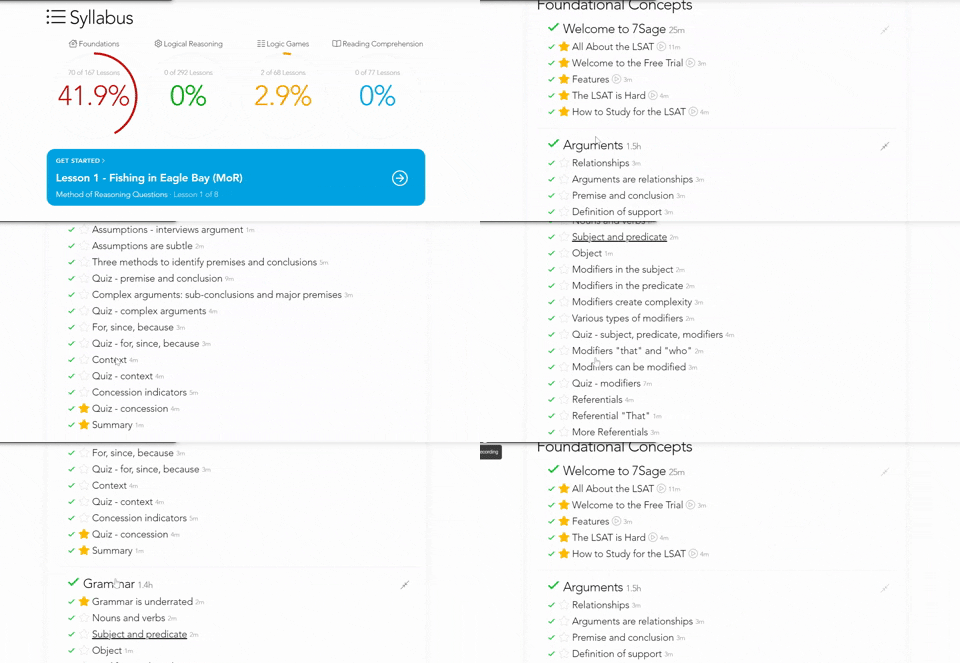
However, I would like to get to the bottom of this so that it is working on your end too. Please try the following:
Clear your browser's cache with these steps:https://classic.7sage.com/clear-cache/
Try using a different browser. We find that the Chrome browser works best with our course, but Firefox and Safari work well too.
Again, I am terribly sorry for the trouble. If you are still having trouble, please let me know what device you are using (Windows or Mac) and what browser you are using so that I can further investigate the issue.
Please also let me know if you have any further questions or concerns. I am happy to help!
IT'S BACK NOW!!!!! YEY!
Same
also having this same issue !
Experiencing the same problem. I refreshed the webpage, re-logged in but still don't see the check marks on the left side of syllabus. So I can't tell which lesson I have finished so far, and from which one to resume. #HELP
^^
I second this issue. Also, I don't have the option to X out answer choices nor the ability to highlight