You can find lessons with printable PDFs in the Syllabus by typing "PDF" in the search bar. Please see my GIF below:
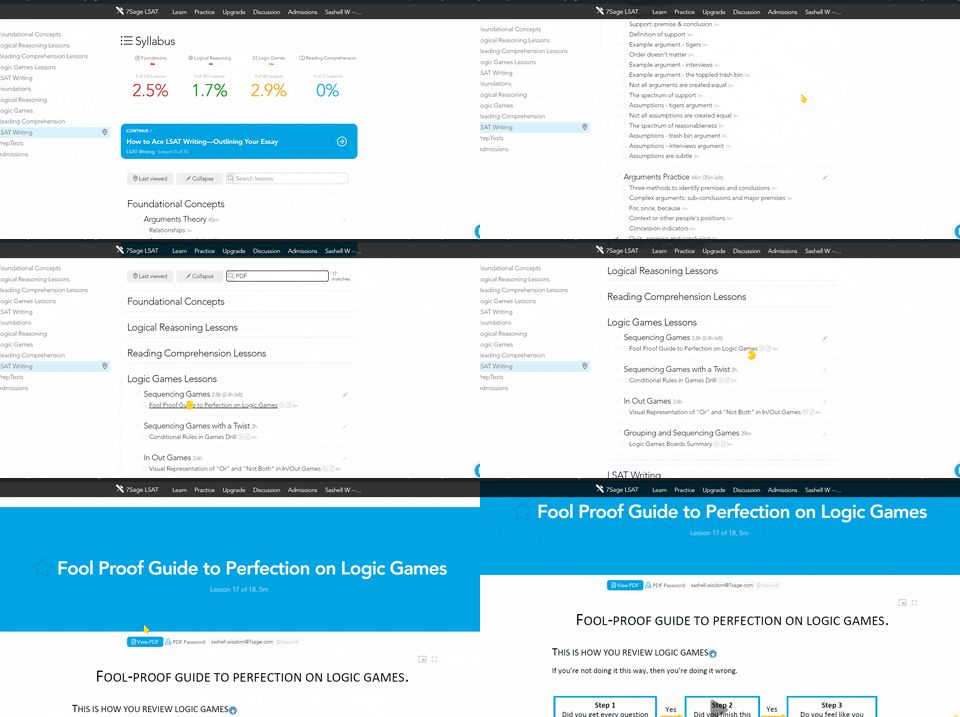
The password for the PDFs is your 7Sage email address.
Here's how you can print the materials on the website that are not optimized for printing:
1. Press Ctrl + P (if you are using Windows) or Cmd + P (if you are using a Mac computer)
2. On the pop-up screen, select only the pages you want to save (so the comments will not be included in your PDF download)
3. Select “Save”
I hope this helps!
0
Topics
PT Questions
Select Preptest
You've discovered a premium feature!
Subscribe to unlock everything that 7Sage has to offer.
Hold on there, stranger! You need a free account for that.
We love that you want to get going. Just create a free account below—it only takes a minute—and then you can continue!
Hold on there, stranger! You need a free account for that.
We love that you came here to read all the amazing posts from our 300,000+ members. They all have accounts too! Just create a free account below—it only takes a minute—and then you’re free to discuss anything!
Hold on there, stranger! You need a free account for that.
We love that you want to give us feedback! Just create a free account below—it only takes a minute—and then you’re free to vote on this!
Hold on there, you need to slow down.
We love that you want post in our discussion forum! Just come back in a bit to post again!
Subscribers can learn all the LSAT secrets.
Happens all the time: now that you've had a taste of the lessons, you just can't stop -- and you don't have to! Click the button.
1 comments
Hi @sashellwisdom15,
You can find lessons with printable PDFs in the Syllabus by typing "PDF" in the search bar. Please see my GIF below:

The password for the PDFs is your 7Sage email address.
Here's how you can print the materials on the website that are not optimized for printing:
1. Press Ctrl + P (if you are using Windows) or Cmd + P (if you are using a Mac computer)
2. On the pop-up screen, select only the pages you want to save (so the comments will not be included in your PDF download)
3. Select “Save”
I hope this helps!