


- Joined
- Apr 2025
Discussions

Hi @colinlang64878!
To take a 5th section you will need to create a custom problem set with the section you would like to take as a 5th section. If you aren’t familiar with the custom problem set interface, here are some instructions on how to do this:
Go to https://classic.7sage.com/problem-sets/
Tap “Create Problem Set From Question Bank” at the top of the page
Set the PrepTest range and section type you are looking for.
Select the questions/passages/games for the section you want to take. (tip: you can filter to a section by typing something like “pt01 s2” into the search bar, then tap the blue shopping cart icon on the left of the table to select the questions.
Tap “Create Problem Set with…”
Take the problem set.
See the GIF below:
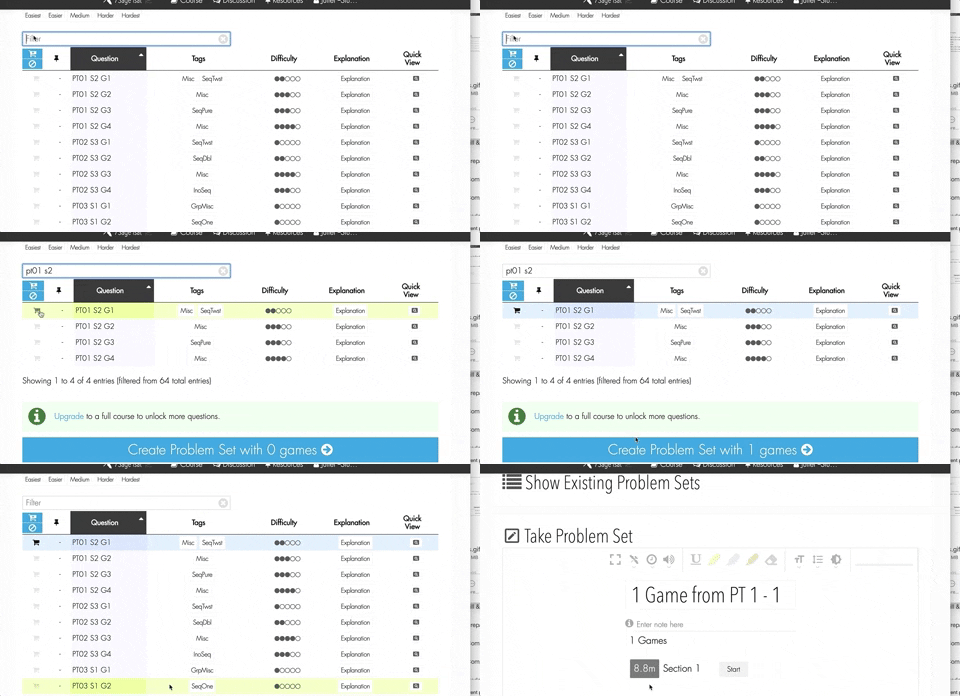
To delete the PrepTest data, go to the PrepTest tab (https://classic.7sage.com/preptests/) and select the PrepTest. Next tap the "delete" button. See the screenshot below:

Let us know if you have any further questions!
Hi @jmarmaduke96714
@jmarmaduke96714 and @ElaineWang are correct - you can change the time with the clock icon:

Let us know if you have any further questions!
Hi @docmarsey318 Ipsum!
Custom problem sets should save automatically:

You can also make a "fresh copy" of a problem set, if you want multiple "clean" copies to take in the future, by clicking the "Fresh copy" button. Example:

Let us know if you have any further questions!
@ElaineWang
This may sound obvious, but we have to check - are other videos (like from other websites, YouTube, etc. or local media files on your computer, like a saved video) also still working normally?
@ElaineWang
Do you mind giving us more details so we can try to pinpoint the issue? If you could let us know what browser/app you're using and what device (computer, laptop, tablet, phone), that would help us narrow things down. Echoing what @juliet7sage said, if you have access to other devices and find that it works on one but not the other, that info would also help.
If you don't want to post this info publicly, please either DM me or email studentservice@ElaineWang.com.
Hi @ElaineWang!
I'm sorry to hear about this - it sounds very frustrating!
Which video player are you using? The issue might be solved by switching to our "Simple" video player. The simple one lacks some of the advanced features like time cues, but we've purposely created it to "play nice" with the largest pool of devices and browsers. If you go to "Settings" and then choose "Simple" under Video Player, it might fix your loading issues. I've attached an example screenshot here:

Also, if you use any sort of ad-blocker plug-in/software, we've found that sometimes that also prohibits our videos from being played.
Let me know if this doesn't fix your problem and we'll continue troubleshooting!
Hi everyone,
You've probably already seen it, but in case you haven't - J.Y. released a post today about the account changes: https://classic.7sage.com/discussion/#/discussion/22617/upcoming-changes-to-7sage-courses
Hi @lucky7wy192,
Right now, it looks like we'll be able to make an announcement around March 4th.
Hi @43226!
Sorry, that's definitely frustrating. I tried to reproduce the issue with the app on iPhone, but it's not showing up on my side. Do you mind sharing some more details about what happened on your side so I can more closely match what is causing the issue? Thanks!
If you want, you can also email studentservice@ElaineWang.com directly.
@czechoutnic844
This may not help your situation right now, but I wanted to let you know that we do have a "score guarantee" that says if you have an unsatisfactory score, to show us the report and we will extend your course until the next LSAT test administration date.
Of course, I hope you score high and don't have to take advantage of this! But, just letting you know in case something goes awry.
Hi @ElaineWang!
Your materials will be available until June 1st, 2020. What happened is you bought Ultimate before we instituted the change from 12 months to 9 months, so you got the full 12 months.
Let me know if you have any further questions!
Hi @michaelcinco801.Cinco!
We have this post from January with interview Qs from 2018-2019: https://classic.7sage.com/admissions/lesson/law-school-interviews/
We also have this Coda doc up that is constantly being updated with Qs from 2019-2020: https://coda.io/d/Canonical-7Sage-Law-School-List_daa7untIi1o/Interview-Questions_suLfA#_lu3EC
Hope this helps. Good luck!
Hi @ElaineWang,
The approximate date for the completion of the explanation videos is February 15, 2020.
Let us know if you have any further questions!
@ElaineWang @ElaineWang
Unfortunately, our policy has changed, and currently we can't explain any further (although, we may be able to disclose more come February). We now only have the option to extend for one month at a time, but you can choose to do it multiple times. So for example: If you wish to extend for two months, you just need to purchase the 1-month extension twice.
In the meantime, if this change caused difficulties for you, reach out to student service via DM or email and we'll hear you out and do what we can to help.
Hi @miriaml807.Wilson23-1!
@miriaml807 is correct - the password for PDF file access is your email address and not your 7sage password for login.

If this is what you've done and you're still having issues, please either DM me directly or email us at studentservice@ElaineWang.com.
Hi @ElaineWang!
While purchasing higher packages outright will give you more time (For ex: Starter comes with 3 months and Premium comes with 6), upgrading from a lower package will only give you an additional one (1) month to your account. So going from Starter to Premium would give you one extra month, whereas going from Starter to Ultimate would give you a 2 month extension, for example.
Let me know if you have any further questions!
Hi @michaelcinco801.chanhee.lee!
The new PrepTest is added to the Ultimate+ course within 1 week of its release. We also start selling it as an add-on within 1 week, and all video explanations are done within 30-60 days from then. Based on that and barring anything unexpected happening, it is possible that the LSAT explanations would not be up on 7Sage until Feb. 17th if it takes the full 60 days, although it could be sooner. Letting you know so you can plan accordingly!
Thanks @taschasp823 for jumping in and beating us to the punch! It's 7Sagers like you that make this community great. :)
@21106.alaniz Glad this is fixed! Please keep us posted if you run into any other issues.
Hi @21106.alaniz!
Do all the lessons in the future up to the "current" lesson have green checkmarks? You can make it "go back" to the correct lesson by unclicking them (see gif)
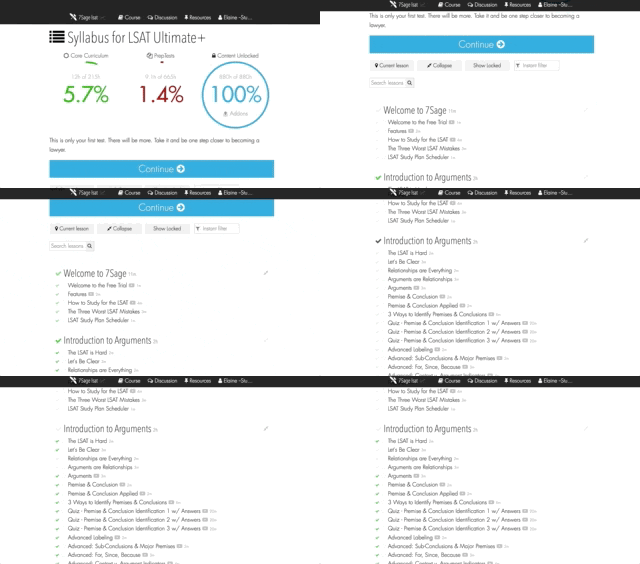
If this doesn't solve your issue or it's not the same issue, please let us know so we can fix it! You can also DM me directly.
Hi @jinnie871791!
Our preference for these posts is to not delete - even if you've figured out your "mistake," it is still helpful for others who may have made the same mistake. This post is a great learning opportunity for the rest of the 7Sage community!
Let us know if you have any further questions! You may also message me directly.
Hi @chendaniel111!
Barring anything unusual, we usually get the test from LSAC the day it is released (this one would be around Dec. 19). The new PrepTest is then added to the Ultimate+ course within 1 week. We also start selling it as an add-on within 1 week, and all video explanations are done within 30-60 days from then.
Hey 7Sagers,
Here's the official November 2019 LSAT Discussion Thread.
**Please keep all discussions of the November 2019 LSAT here!**(/red)
Rules:
✅ You can identify experimental sections. 🙆♀️
You can say things such as the following:
❌ You can't discuss specific questions. 🙅♂️
You CANNOT say things such as the following:
Hi @ElaineWang
We don't suggest converting a test after you've started it, because switching mid-test can have strange results. However, I've personally tested it after completing the first section on a PT (from digital to paper and vice versa) and it didn't mess up my results. However, we can't guarantee that it will work every time or that it won't mess up, sorry!
If you don't mind my asking: why do you want to convert it mid-test? Maybe there's a work-around or another solution we can help with?