@Stas1973 Thanks for reporting this! I want to make sure I understand the issue correctly.
Just to clarify—when you go to the Questions page, it displays PrepTests starting from the newest (PT159) by default. This is the expected behavior. When you apply a filter, the page should show different questions based on your filter criteria.
When you apply a filter, what happens next? Does it:
Take you to the PT159.S1.Q1 question page itself (leaving the Questions list view entirely), or
Stay on the Questions page but show PT159.S1.Q1 at the top of the filtered results?
A screenshot of what you're seeing would be really helpful so we can investigate this properly!
@Mary Thanks for your help! Anything I try to press in the screenshotted area below, no matter what I press, takes me directly to the PT159.S1.Q1 question page itself.
@Stas1973 Thanks so much for the screenshot and clarification!
I was able to replicate the issue on Apple mobile devices (iOS/iPadOS) on both the 7Sage app and browsers (Chrome and Safari). You're right that clicking anything in that filter area is taking you directly to the PT159 question page instead of applying the filter.
We're working on getting this fixed. In the meantime, if you have access to a desktop or laptop, the filters work without issue there if you need to use the Questions page.
I'll update you once we have this resolved. Thanks for bringing this to our attention and for your patience!
@Stas1973 I tested on Mac Chrome and the Questions page filter is working there without issues. 7Sage works best on Chrome, so I'd recommend trying that browser in the meantime while we work on fixing the issue.
@Magexx14 What you're experiencing is actually the expected behavior. When you click a question from a completed drill set, it opens the review page where you can see the entire set of questions. However, it should take you directly to the specific question you clicked.
So if you click PT142.S1.Q7 from the results page, the review page will open with the full set, but you'll start at PT142.S1.Q7—the question you selected.
If you were experiencing an issue where it redirected you to the incorrect question, that issue has been fixed. If you're referring to a different issue, please send more details to studentservice@7sage.com. A short video showing what's happening would be really helpful! Thank you.
@Peter888 The issue where clicking certain elements would redirect you to the wrong question or last viewed page has now been fixed. Navigation should work properly throughout the site now.
Feel free to reach out if you notice anything else!
@IvonneRosario Similarly, when reviewing a drill or section or PT when I click to go to a specific question it takes me to the last question in the set.
@Nillaw35 Thanks for letting us know! We’re aware of the issue where clicking a specific question in a Drill, Section, or PrepTest takes you to the last question in the set, and our team is currently working on a fix.
In the meantime, if you’re on a laptop or desktop, please try using Chrome—clicking a question there will redirect you to the correct one. We appreciate your patience while we resolve this!
@Mary Thank you I'll switch to chrome! Also the same glitch is prevalent when trying to use the study plan shortcut guide in the bottom left hand corner (no matter what lesson you try to go to it takes you to the last viewed question)!
@Nillaw35 Thanks for the update! The issue with the study plan shortcut and clicking specific questions has now been fixed. Everything should now take you to the correct lesson or question instead of the last viewed one.
You can continue using your preferred browser, including Chrome, and everything should function properly.


15 comments
I am experiencing the same. When I go to 'questions' and I try to filter, it takes me to the most recent question (159.01.01).
@Stas1973 Thanks for reporting this! I want to make sure I understand the issue correctly.
Just to clarify—when you go to the Questions page, it displays PrepTests starting from the newest (PT159) by default. This is the expected behavior. When you apply a filter, the page should show different questions based on your filter criteria.
When you apply a filter, what happens next? Does it:
Take you to the PT159.S1.Q1 question page itself (leaving the Questions list view entirely), or
Stay on the Questions page but show PT159.S1.Q1 at the top of the filtered results?
A screenshot of what you're seeing would be really helpful so we can investigate this properly!
@Mary Thanks for your help! Anything I try to press in the screenshotted area below, no matter what I press, takes me directly to the PT159.S1.Q1 question page itself.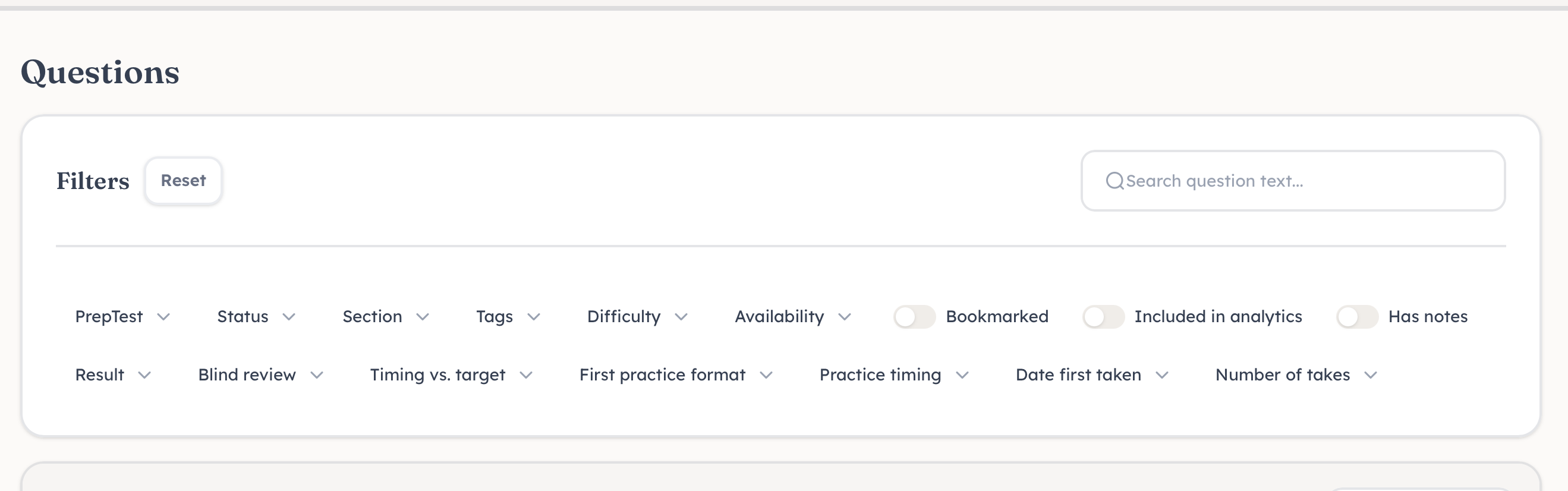
@Stas1973 Thanks so much for the screenshot and clarification!
I was able to replicate the issue on Apple mobile devices (iOS/iPadOS) on both the 7Sage app and browsers (Chrome and Safari). You're right that clicking anything in that filter area is taking you directly to the PT159 question page instead of applying the filter.
We're working on getting this fixed. In the meantime, if you have access to a desktop or laptop, the filters work without issue there if you need to use the Questions page.
I'll update you once we have this resolved. Thanks for bringing this to our attention and for your patience!
@Mary Thanks so much! I did notice the glitch on my laptop Mac Safari so hopefully it clears up there :)
Have a great evening
@Stas1973 I tested on Mac Chrome and the Questions page filter is working there without issues. 7Sage works best on Chrome, so I'd recommend trying that browser in the meantime while we work on fixing the issue.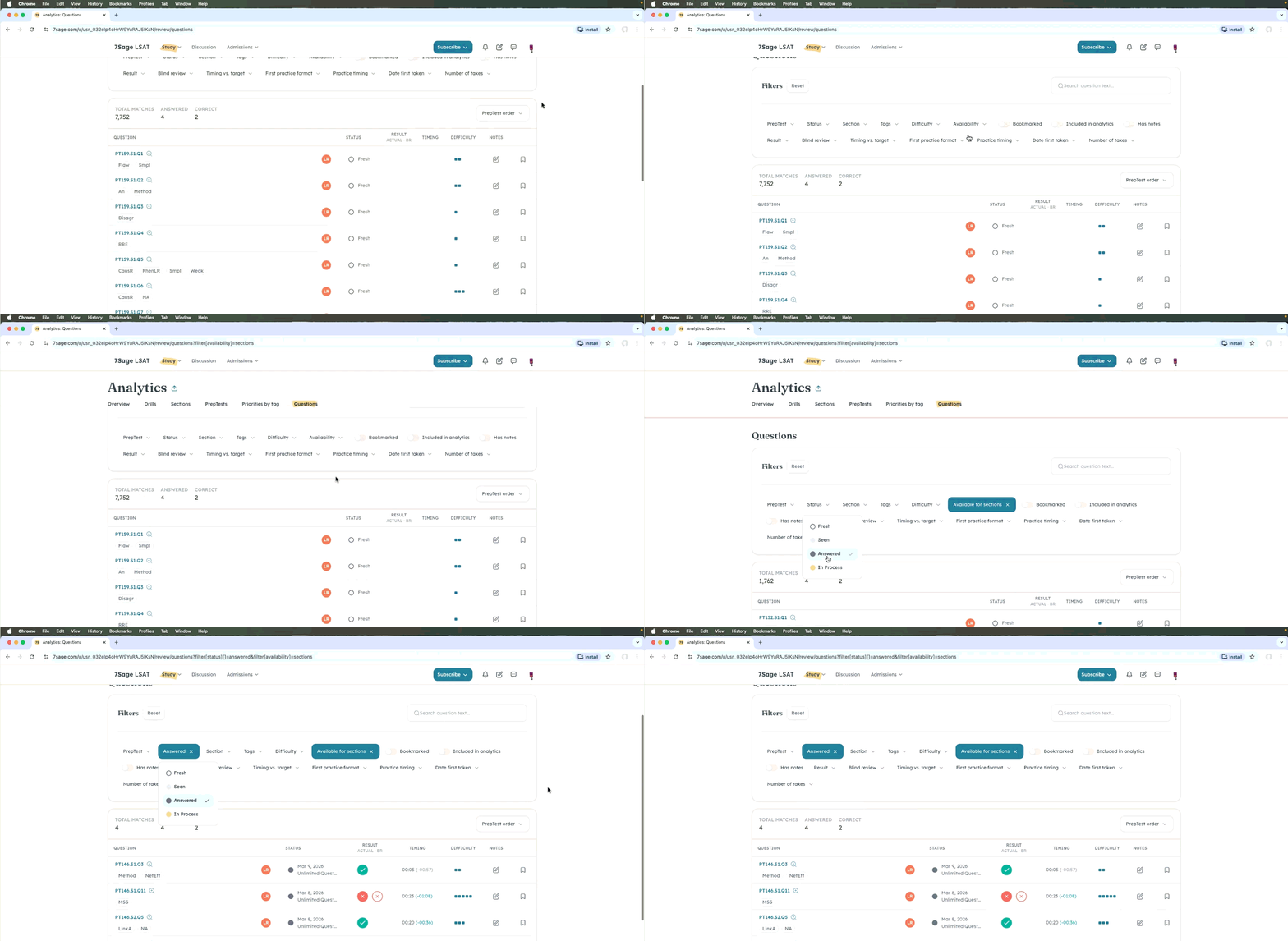
Hope that helps, and have a great evening!
@Stas1973 Great news! The issue with the filters has been fixed. Please let me know how it goes or if you need further help!
I am also experiencing glitches....when I click to view on a singular question from a drill set, it opens up the entire set.
@Magexx14 What you're experiencing is actually the expected behavior. When you click a question from a completed drill set, it opens the review page where you can see the entire set of questions. However, it should take you directly to the specific question you clicked.
So if you click PT142.S1.Q7 from the results page, the review page will open with the full set, but you'll start at PT142.S1.Q7—the question you selected.
If you were experiencing an issue where it redirected you to the incorrect question, that issue has been fixed. If you're referring to a different issue, please send more details to studentservice@7sage.com. A short video showing what's happening would be really helpful! Thank you.
@Peter888 The issue where clicking certain elements would redirect you to the wrong question or last viewed page has now been fixed. Navigation should work properly throughout the site now.
Feel free to reach out if you notice anything else!
Hi @Peter888
We're sorry for any trouble. I have reached out to you via email and provided some troubleshooting steps you can follow. Please check your inbox.
@IvonneRosario Similarly, when reviewing a drill or section or PT when I click to go to a specific question it takes me to the last question in the set.
@Nillaw35 Thanks for letting us know! We’re aware of the issue where clicking a specific question in a Drill, Section, or PrepTest takes you to the last question in the set, and our team is currently working on a fix.
In the meantime, if you’re on a laptop or desktop, please try using Chrome—clicking a question there will redirect you to the correct one. We appreciate your patience while we resolve this!
@Mary Thank you I'll switch to chrome! Also the same glitch is prevalent when trying to use the study plan shortcut guide in the bottom left hand corner (no matter what lesson you try to go to it takes you to the last viewed question)!
@Nillaw35 Thanks for the update! The issue with the study plan shortcut and clicking specific questions has now been fixed. Everything should now take you to the correct lesson or question instead of the last viewed one.
You can continue using your preferred browser, including Chrome, and everything should function properly.
Thanks again!