


Discussions

@Mimi_Hadi Safe travels! I responded to your email inquiry with tips for studying offline during your flight. Please check your inbox, including spam, and let us know if you have any questions!
@mohsefbukhari Sorry for the trouble! We responded to your emails a little earlier and were able to apply a fix, so your LawHub Advantage should now be correctly synced with your new 7Sage account. You may just need to refresh your page for the update to take effect.
Thanks so much for your patience! Please check your email for the full details, and feel free to reply there if you're still running into any issues.
@BillyTheKidd02 Only full-length PrepTests from LawHub are automatically imported into 7Sage when you use the auto-import option on your import page. Any drills or sections you did with another prep company aren't counted here, and the "% fresh" indicator only reflects questions completed within 7Sage or full PTs imported from LawHub.
Hope this clears things up! Feel free to reach out if you have any other questions.
@NoNamed92 Sorry for the trouble! I've sent you an email to help. Thanks for your patience.
@dgirardot Thanks for flagging this as well! I've sent you an email to help troubleshoot. Appreciate your patience!
@Splitter3516 @Parkerzs I've reached out via email to help with these issues. Let me know if you didn't receive it. Thanks for your patience!
@DevorahLeahPaltiel @RubyValencia @Dancingtiger @Shivvyosullivan Hey! We removed your email/phone number to help prevent spam. If you want to share contact info, please use direct messages instead. Thanks!
Sorry you're experiencing this! I reached out via email to help. Let me know if you didn't receive it.
Hey! We removed your email to help prevent spam. If you want to share contact info, please use direct messages instead. Thanks!
Hi there,
I reached out via email to help. Let me know if you didn't receive it!
@GulnessaAsif You can use our manual import tool to input the answers from PrepTests you've taken on paper, and they'll be factored into your analytics.
Let us know if you have any questions!
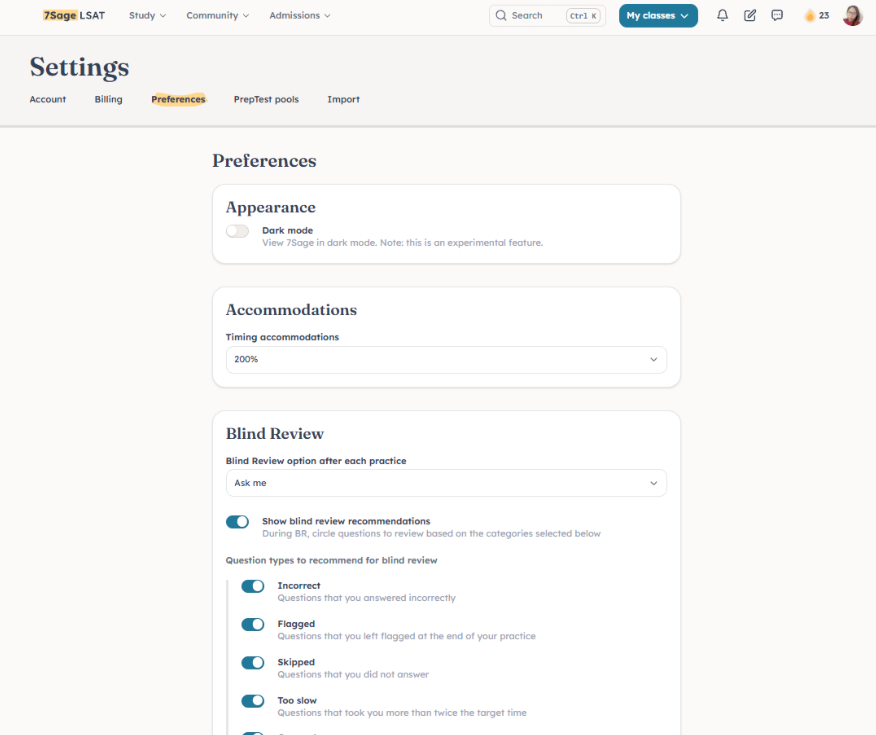
@Nate0066 The setting has since moved. You can now find it under Preferences.
@SarahR64 So sorry about this! I've reached out via email to help. Please check your email inbox. Thank you.
Hi @rc39
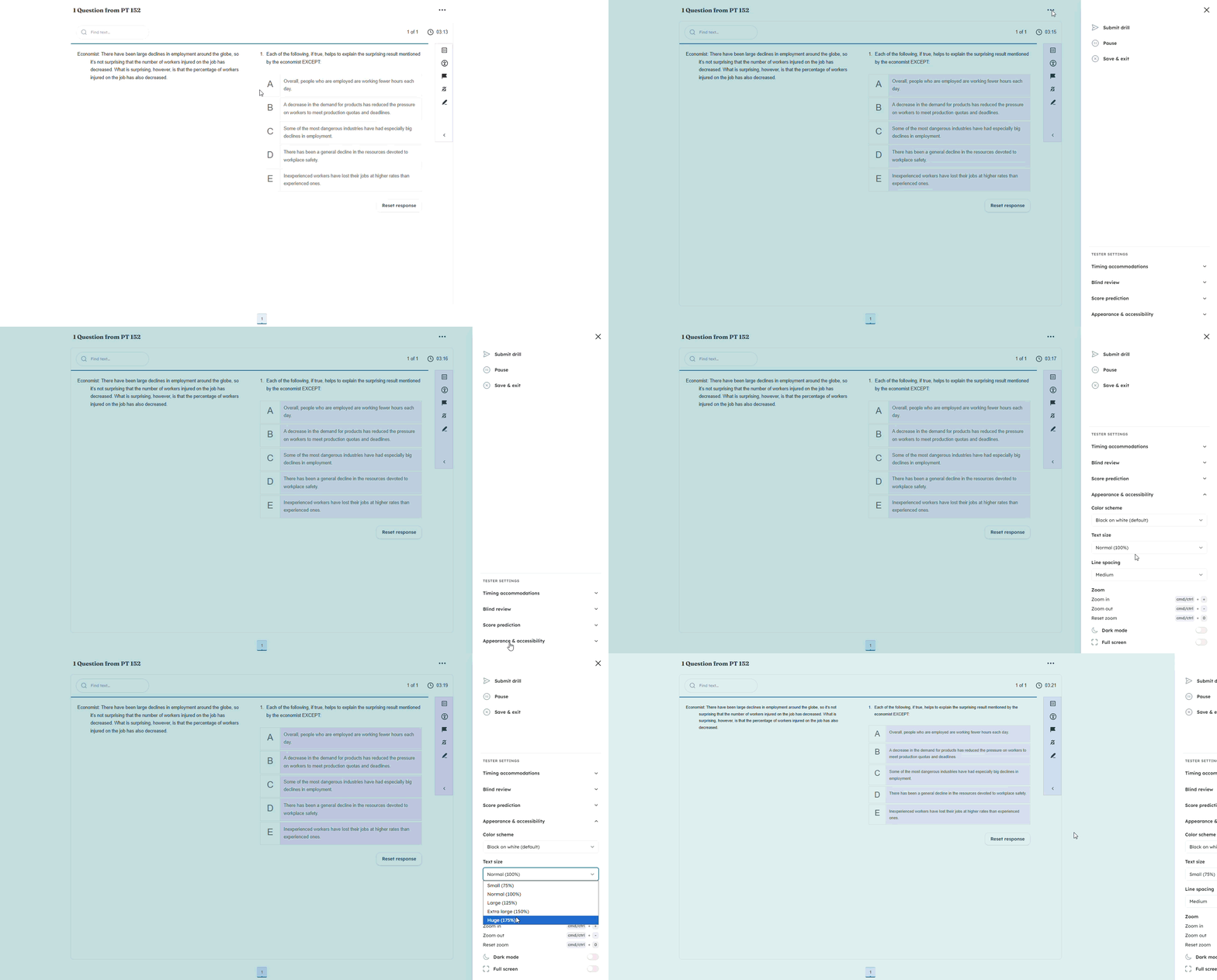
You can adjust the font size by clicking the three dots in the upper right corner, selecting Appearance and Accessibility, and choosing your preferred text size.
Feel free to reach out if you need any help!
@strawberryicecream I've reached out via email to help. Let me know if you didn't receive it!
Hi there,
Sorry for the trouble! I've reached out via email to help with the issue. Please check your email inbox. Thank you!
@strawberryicecream @Allison-Buehler The issue has been fixed! Thank you for patience as we worked on it. Let us know if you have any questions. Happy studying!
@reynita04 I reached out via email. Let me know if you didn't get the message!
@Chel's I just resent you the email. Please check your inbox. Thank you!
@lagata I've resent the decision email. Please let us know if you still don't see it!
@macorsi If you cancel and resubscribe within 60 days, your progress and analytics will pick up right where you left off. Beyond that window, we can't guarantee your history will still be available.
If you'd like to explore the pause option instead, feel free to reach out to us at studentservice@7sage.com and we'll be happy to help!
@iloveenergydrinks So sorry for the trouble! I sent you an email to help with these issues. Let me know if you didn't receive it. Thank you!
@AJGJ Sorry for the trouble! We responded to your email about this. Could you please check your inbox? We'll be happy to continue helping you there!
@Mimi_Hadi Just following up! You can now view lessons offline on the app. Here's how to set it up:
While you're online, open a lesson you'd like to review later. After that, you'll be able to view all of the written content offline.
For video lessons, play each lesson video for a few seconds while you're online. You'll need to do this for each video you want to watch offline.
Please note that you can’t do a live drill or PT offline, but you can download drills and PTs as PDFs:
PrepTests: Go to Study > Drills, Sections, PTs. In the PrepTest section, select the PT you’d like from the dropdown, click the three dots to the right, and click Download PDF.
Drills: Create a drill first and start it. Then click the three-dot icon in the upper right of the digital tester and click Print.
Let us know if you have other questions!