


TL;DR = Try using the highlighter for eliminations?
If you've used elimination mode in the new tester, you've probably noticed it's clunky:
While elimination mode is on, clicking an answer only eliminates it. To actually pick an answer, you have to turn the mode off first.
If you pick an answer and change your mind, you're stuck. Clicking it again won't unselect it, and you can't eliminate an answer that's already selected.
Your only ways out are to select a different answer and then eliminate the first one, or hit Reset Response. But Reset Response also erases all your other eliminations.
Here's a potential workaround: use the highlighter. To eliminate an answer, highlight its first few letters (or really any part of the answer) and click the red/pink highlight button. Red means wrong. The big plus is you don't have to switch to masking mode to do this.
It also fixes the misclick problem. Say you meant to eliminate C but selected it by accident. Just hit Reset Response. Your highlights stay, so you don't lose the eliminations you already made.
Unfortunately deleting a highlight on an answer choice is pretty annoying, but overall this method might be less clunky than the traditional way to eliminate. I don't know.
That's why I want your help. If you find the traditional elimination mode clunky, try the style I suggest here. Use this method for a few drills or a full section, then reply here and tell me what you think.
16 comments
I started doing this recently and have found it to be very helpful. However, instead of highlighting the first few letters or first word of answer choice, I highlight the exact words that made me think an answer choice was wrong. This helps me to remember/track my thought process during review as well.
I’ve been highlighting to eliminate for a few months now, and I’m pretty sure I learned it from you when response masking first became a thing.
In cases where I prephrased, an answer choice matches my prephrase, and the rest are obviously wrong, I don’t highlight at all. I simply select the choice I want and move on. For questions where I have a broad prephrase and the correct choice won’t be so apparent to me, I highlight the word or phrase that makes me want to eliminate a choice. For example, if an incorrect choice is using a different domain or subject than I want, I highlight that. After I’m done, I’m left only with one choice that has no highlighting, and I choose that one.
I’ve found this approach helpful for getting around the masking feature. Anecdotally, though, I don’t find masking clunky at all. I used it sparingly in practice leading up to my August exam, but I used it more on test day without any issues. I had felt like all of the answer choices were being mixed up in my brain, and I needed to not see some of them. However, I do think I was more prone to nervously eliminating choices with the masking rather than making educated decisions. That’s where highlighting to eliminate is valuable for me. The method works for slowing down just enough to make sure I’m reasoning through each answer choice with the skills and concepts I’ve learned instead of acting on fearful instincts to rush.
Overall, I’ve actually noticed an improvement in my performance from consistently using highlighting to eliminate, and I’m hoping to keep that up on Saturday. Hope this was helpful!
I highlight the word/words that make the answer wrong
Yes! Using this method and then highlighting the strong language makes me fly through the answer choices even when I am a bit stuck.
Thank you so much. That is a great idea. I would have never thought of that. It will make the process so much more seamless. I had stopped using the "elimination" feature entirely after the change.
Just tried it out with a drill and I already like it. I never enjoyed how crossing out an AC locked it out and made it harder to read. Obviously, it'd be better if I never cross out the right answer, but it's nice being able to quickly read and realize that it's the right answer rather than clicking to reveal it again.
Creating functional limitations to sink time is one of the most unethical ways to challenge skill set and time management. That would be no different than reversing letters on a keyboard and expecting you to type an extended response under timed conditions. What drove this testing modification?
I was doing this then I stopped for some reason. Have been leaning towards going back.
Great advice, thank you. I’ll use this trick.
I wanted to give another bit of feedback to see if you guys might be able to fix something for me. The videos from lessons have the option of 0.5, 1.0, and I think 2.0 speed. That’s great, but my ideal speed would be like 0.9. The speech can be kinda quick and I have to pause and replay often. Would you be able to make the speed more customizable? Thanks for considering. :)
Do you see 0.8?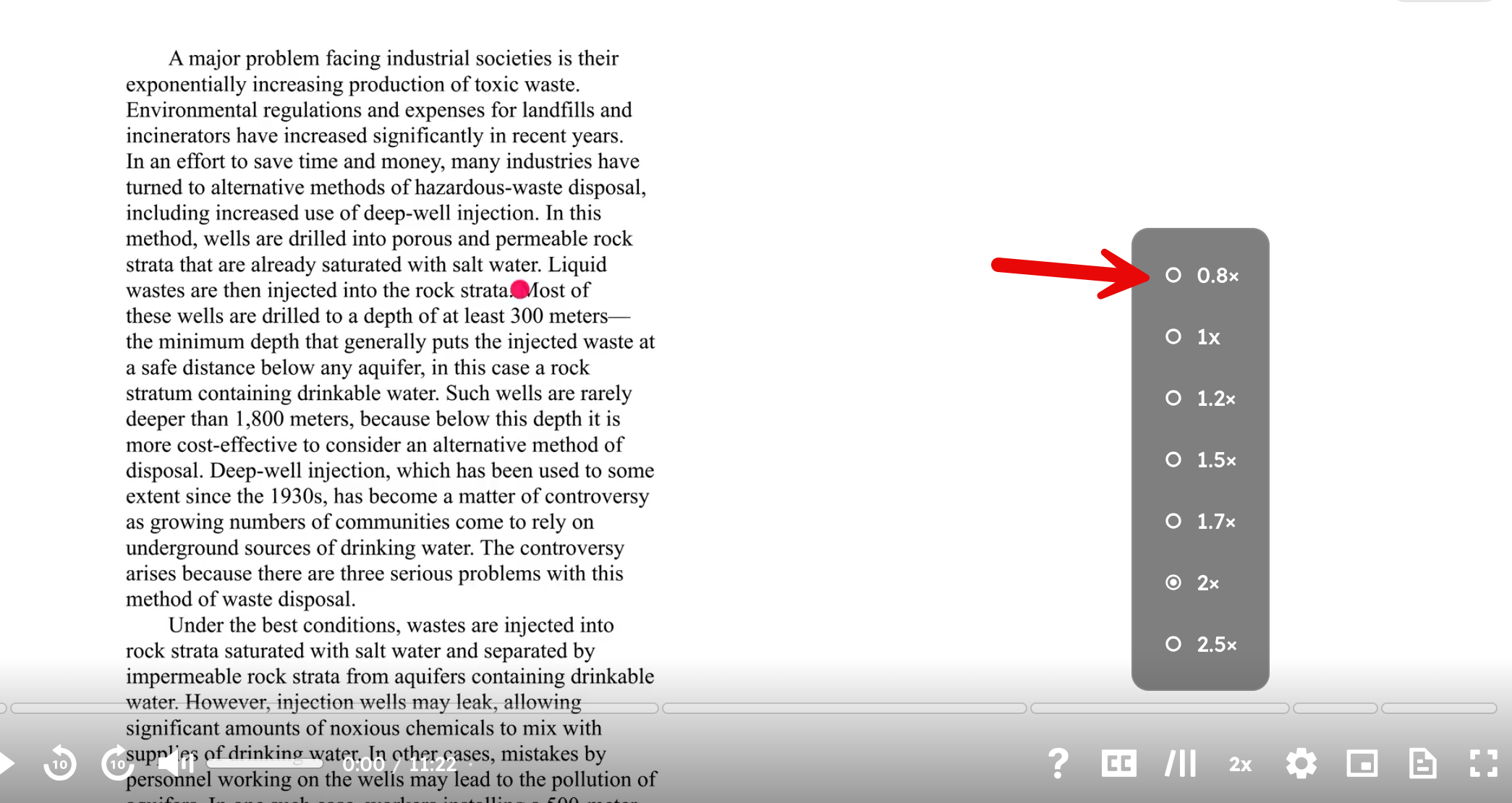
Oh, thank you!
Yes I do see all 7 speed options. Now I realize that my problem was/is 0.8 being too slow to keep my attention, and 1.0 being too fast for me to process all the information. 0.9 is the dream, but I understand that's quite specific! haha.
Thank you for sharing this information, I took my test today and it REALLY helped being familiar with how it works. 🙌
super helpful as always thank u king
My 7sage interface does not have a highlight option for drilling. Am I subscribed to the wrong plan or something
Have you tried clicking and dragging over text in a stimulus or answer choice? The highlight option should show up once you do that.
I like this idea, however I have two concerns. When I'm doing the test I tend to want to be lazy and am okay if I highlight and extra word or two I didn’t intent to highlight because the highlight system is finicky and time consuming to fight. So I might not always highlight the first 2 letters or full word precisely as this system intends. I suspect this would be difficult for a detection software to detect. My other concern is that I sometimes like to use the highlight function on answer choices to remind myself of key words I may be comparing between answer choices or the stimuli. If the word I want to highlight is at the beginning, it may be wrongfully tagged as an elimination.