
Feature Request
New postRequest new features or give feedback about 7Sage.
36 posts in the last 30 days

I'm not sure if this is the right place for this, but I noticed a bug with the drill section when in full screen mode. When you are reviewing your questions, the background of the screen (behind the box of question numbers and answers and all that) goes black. I was in light mode. When I exited full screen it went back to normal.
I just wanted to let you know!
I'm happy to answer more questions if necessary.

I have started using the SageAI and find it quite helpful. Is there a way to open SageAI to view previous chats without asking it a question? I end up "wasting" some of my monthly SageAI questions just by clicking on the available buttons to open the chat (e.g. "Analyze results", "What should I do?"

Hi everyone! I have timed break accommodations, so my breaks are not 10 minutes, the same as the standard break. During my practice tests, I am only able to have the standard 10-minute break in between sections. I wanted to suggest adding a customized feature so that I, along with anyone else who has timed break accommodations, are able to properly stimulate our test day conditions. I think that it would be really helpful!
Thank you!

Hello! This is mostly a post for 7Sage UI team + anyone who may be curious for upcoming administration. I took the August retest a few days ago and noticed a couple things that may clear up lingering questions from the original exam.
Side note, I did not toggle with the accessibility buttons or used the eliminate AC button. I also did not attempt to hide the timer, nor did I use more than one highlighter color. I don't remember a full-screen option, but I also don't normally look for it. Highlighter functions, 'next/back' buttons, passage scrolling all seemed to be the same.
The screen is wider. It's not so wide that it's illegible and fills the entire length of the screen, but it is slightly wider (as in stretched, horizontally) than I had originally seen for the August exam (on the first day of administration) and how it currently is on 7Sage. I imagine that this will be the continuing interface for future exams.
There are no boxes around the AC that clearly delineate which AC is which. Again, not so big of a difference, but the ACs and their corresponding letters seemed to 'float in space'. In my opinion, I thought that it was still clear where the demarcations were, but I can imagine that some people may be thrown off by this.
When you click on the answer choice, the 'box' chosen is still filled with the pale yellow color.
Otherwise, the interface felt really familiar! I wish I could remember more, but I was just trying to push through and finish the exam 😭.

could you add a read out loud app feature to the 7sage app i use it in Microsoft edge and it helps a lot for me and if you had this feature it would help others as well.

Can we please bring back drill links attached to live classes?
They used to be linked for every live class until June. Thank you!

I think more specificity/stats on the analytics page in general would be helpful. However, one thing that I think would be really cool to have on the analytics page is more insight into different question types. I know you can see your accuracy over a certain time period, but I'd love to see a chart on whether I've improved/regressed on a specific question type over time. Also, maybe more stats on which question types I tend to spend the most time on, which ones I BR the most, which ones I switch answers on the most, etc. I think this could be helpful for people to know so they can really focus their studying, recognize their (maybe bad) habits, and ultimately improve in these areas.

I have hundreds of notes. As a result, my notes window turns into visual soup. An added tag feature would greatly improve the notes interface.
Personally, I have a system where I add text to my notes to tag them. For example, I'll type "LR: MSS:" at the beginning of a note. This would allow me to later utilize the search feature to sort by logical reasoning related notes, or just for notes on the MSS question type.
This could be implemented as a built-in tag feature. It could look similar to the existing colorful tags that appear when viewing question analytics. When drafting a note, a user could press a button, allowing them to select from a number of tags. Then after the note is posted, the user could search/sort their notes by a selected set of tags.
If some version of this already exists, please let me know where I can find it. Thanks!
Edit: I notice there is an existing sort-by-tag feature, but the tags appear to be based solely on the question/section number. What I have in mind are broader category-based tags.

Is it possible to look at game history? I know there’s a way to look at questions we did immediately but I was wondering if we can go back and look at the history (I exited by accident a couple times, also sometimes I want to back and look at the question I did wrong again)
Also would be nice/more motivating to see our past game scores

Hi! I would love to be able to type my notes while watching the video explanations rather than having to click back and forth between functionalities.

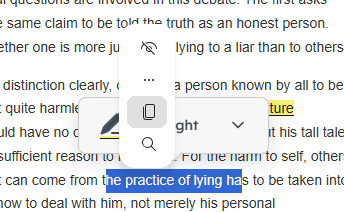
Not sure if anyone else has this issue and if it just my laptop, but when I got to highlight a word or phrase, this Windows select menu appears hovering over the "highlight" option. This is a minor bug, but the extra 1-2 seconds that takes me to unhighlight and reclick the highlight tool adds up over time to the RC section.
I was wondering if this issue could be looked into and resolved?
Thanks!

As of recently, whenever I am drilling in the 7sage android app, then tab over to another app, and then tab back, the app freezes and that loading refresh br thing at the top of the screen shows up, and keeps buffering, but never succeds. So, I keep having to manually close and reopen the app to force the refresh. I'm assuming this refresh thing is to maintain a net connection for access to the legally protected LSAC questions? It used to happen before but it usually refreshed after a few seconds, now it almost always gets stuck indefintly. Happens independet of wifi, cell, or service quality.

Since it is recommended to spend an average of 1.5 minutes on each question, it would be super helpful to be able to see whether we are over the allotted time for each question, in real time, during timed practice. Kind of like an added timer that turns red when we are over time for each particular question (it would make it way easier to keep time tracking as opposed to trying to keep track whilst focusing on the test).
Thank you!

@J.Y.Ping @Kevin_Lin
 before when studying the question would have the pt number right on the answers like above now it does not. this is super helpful when going through a longer drill and wanting to know exactly what PT a question is from.
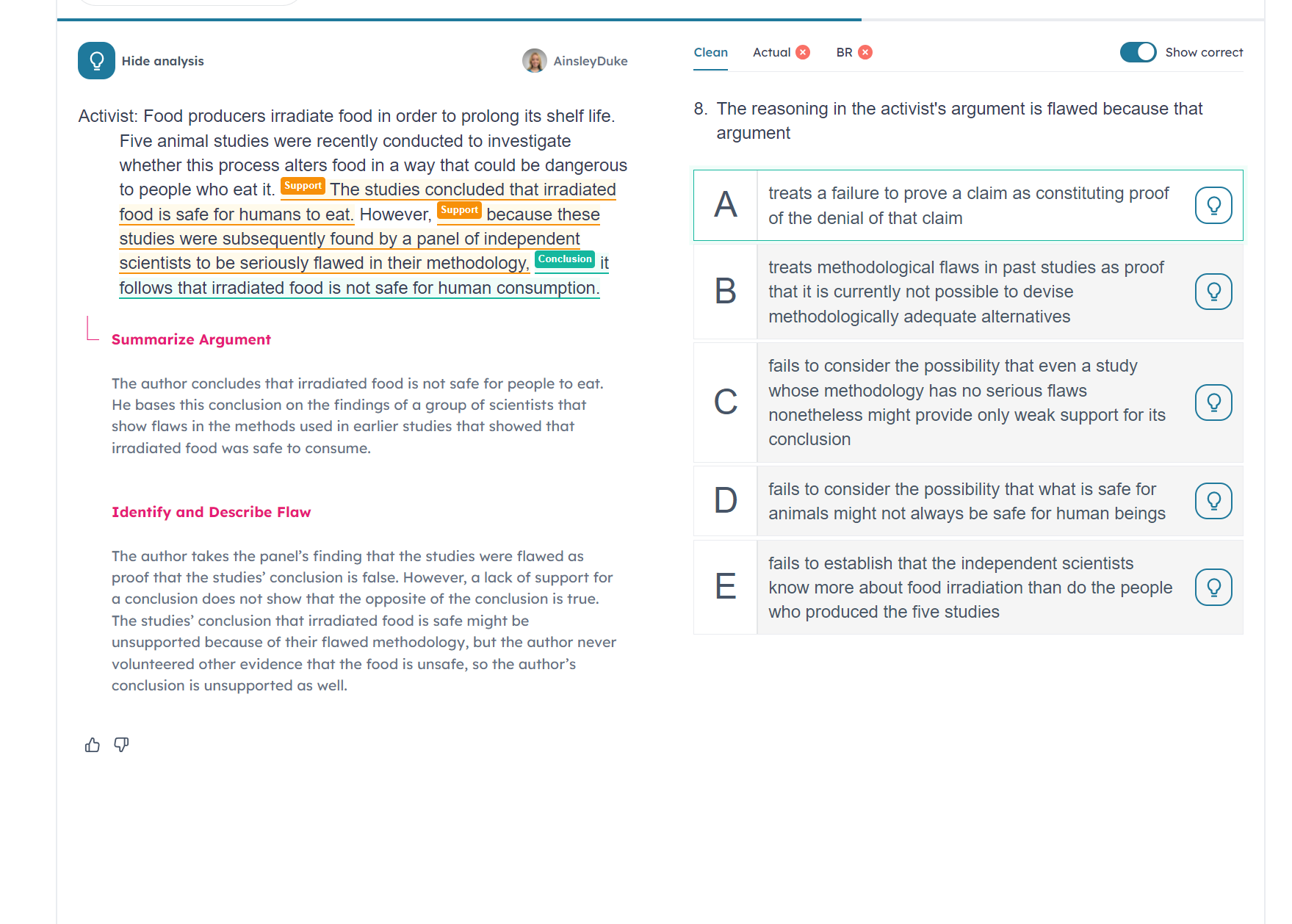
Can we please bring it back.
Also regarding the font when we are doing review so after we have already done the question and the BR in the LSAT ugly format can we have an option to put it back to the 7sage font. i do not like the lsac font for reviewing my answers. or can we have a toggle to decide?
Thank you in advance

It seems that LSAC readjusted their percentiles for LSAT scores, and scores are 1-2% lower than before. I was wondering when 7Sage is planning to update their percentiles?
Thanks!

Would we be able to get the old BR interface back? I get that the new one matches the LawHub UI but technically even when they changed the first time the BR UI didn't. The actual drills can, and should, stay however LawHub has them formatted, but can we bring the BR UI back to what it was before? This format is really hard to navigate especially when I'm going back and forth between my actual and BR. Thank you!

Hello, I was wondering if there was a way to make the subtitles on the videos customizable. Right now there is only one option and they take up half of the screen lol. Just wondering :)

Can we get a predict the answer mode and button for the LR sections/drills? Like a mode that will blur the answer choices but let you read the question, and a button to toggle off the blur. This would help better predict answer choices before.

QOL Request: Would it be possible to make the chapters and comments sticky/stop constantly hiding themselves?
Every time I click next lesson in the study plan, the chapters on the left-hand side that show me where I am in today's content keeps hiding itself. The comments behave in the same way. It would help a lot if I could just toggle them on/off and it stays the way I set it to, rather than it automatically toggling both chapters and comments off by default every time a new lesson is loaded.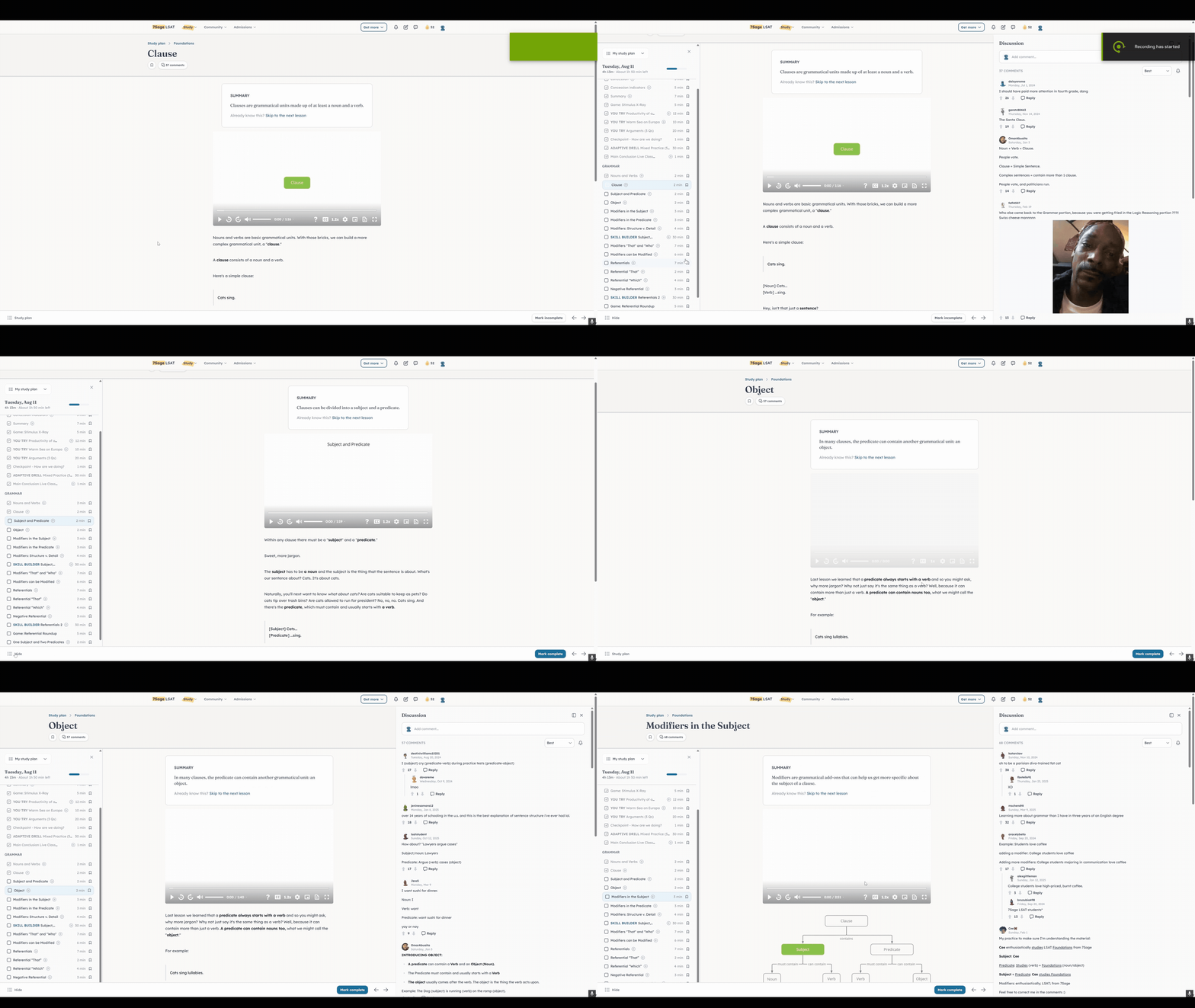

I wanted to request that the "date first taken" filter be modified so that you can more easily filter for questions that you have not attempted in a long time, e.g., perhaps adding an indicator of how many days ago you last attempted a question (presumably a variant of the "most recent" filter could accomplish this as well). As someone who has drilled a lot of questions throughout my LSAT studying process and only drills a certain subset of the material (questions of a specific type of a certain difficulty level, as per my analytics), it would be great to be able to more easily discern material that I have not encountered in a while. Thank you!

I am currently on the Live plan, but I prefer to watch the videos when they are recorded and uploaded so that I can pause, fast forward etc. What's cramping my flow is the lack of a way to keep track of what videos I've watched. It's the worst to settle in for a class video recording and then halfway through the 2nd problem you realize that you've already watched this class.
I'm shocked there's no playlist feature, no "Seen" tag? The bookmark feature is bare minimum tbh.
I'm also realizing that more recent classes tend to not be tagged by Question Stem and Stimulus Logic type any longer? Which is a shame because that's a great way to be able to sort through available content.
Is there a way to blind review after manually importing a PT?

To preface, if this feature already exists--apologies in advance but I'd love to know where!
Right now, I manually add bookmarked questions to my drills. While this process works, it's highly inefficient. If there was a way to select "Bookmarked" as a status that would be great. Thanks.

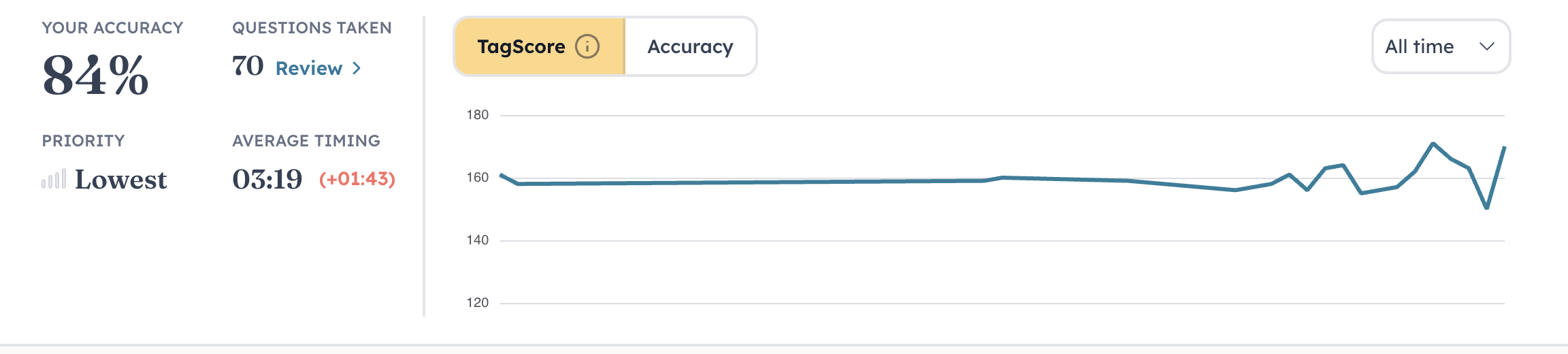 I wish there was a way to see this on one page for all of my question tags

Hi-
Two very basic QoL requests:
Display reasons for BR flags Post-BR
Currently, you can only see why a question was BR flagged during BR (by hovering over it). Then, when you get to the Post-BR review, this info is not available. Obv, you can develop a system to intuit why it was flagged, but i'm sure many students have not developed this system (see system below for completeness). Including them Post-BR would be very informative and helpful
I have qualms with this even being an option during BR (looking at this before completing BR can be very tempting, and looking reduces the value of BR by giving you extra info, ie if you know its incorrect, you can then elim your originalanswer, etc) but that is besides the point
Show Post-BR question data at the question level
Currently, you can only see this sort of data (answer bar graph, timing data, difficulty data) at what I will call the section/section review level (ie what you see immediately Post-BR). While it is helpful, the only way to look at his alongside the questions is with multiple tabs, or by repeatedly entering and existing questions. I often take pencil and paper notes of this info when relevant, so that I can refer to it while reviewing questions Post-BR. Having this detail at the question level (where the Post-BR review is most important!) would lead to more efficient and informative review