


Update: the changes below are live!
******************************************
We're shipping an update to the Digital Tester this week. The goal is to make practice look and feel more like test day. Here's what's changing.
Narrower width, full height
The tester will be slightly narrower and run at close to full screen height. This will match the reported proportions of the real thing more closely. You'll still see your browser window and menu bar at the top, but otherwise the dimensions are close to what you'll see on test day.
The full screen button in the toolbar will be gone
LawHub removed its full screen button, so we will remove ours. Since the tester will now size close to full screen by default, you shouldn't need it. If you want true full screen, use the three dot menu on the top right.
Updated toolbar icons
Toolbar symbols will match LawHub's. The most noticeable change is answer elimination (also called response masking), which will use an "a" with a slash through it.
Blind Review and Review testers restyled
Blind Review was stuck on the old tester style. It will match the current tester, as will the review interface. You'll see consistent styling across the tester, the Blind Review tester, and the Review tester.
One deliberate deviation: font size persists, unlike LawHub
On LawHub, your font size selection does not carry over from section to section. You have to reset it at the start of every single section of a PT. We're not copying that. On 7Sage, your font size choice will stick.
We don't think LawHub's behavior here is intentional. Color and line height settings both persist. Font size is the odd one out, which looks like a bug. We've flagged it to LSAC and asked them to fix it. We'll let you know if they do. Or if this is actually intentional on their part.
78 comments
awesome!
thanks, the new format on the august lsat would've thrown me for a loop if I had not practiced previously on 7sage thanks to yall's constant updates to match lsac's interface.
@Rizzo Yes!! I was shocked when I came back after a while off between test--so thankful that 7Sage is dedicated to staying updated.
I miss the old tester.
bro why can't they just keep it the same? Genuinally why is LawHub doing this?
@NicholasMcIvor I hate it, I can barely read the text omg.
@NicholasMcIvor I wanna know their rationale behind making the letters of the answer choices 7ft tall.
@NicholasMcIvor A conspiracy theorist may surmise they are trying to introduce random difficulty to slow down the inevitable score inflation, but clearly they have some really good reasonable reason.
Thanks, this is great! Any plans to add the "Stop/Start Passage timing" button back to RC questions? Not having it is making the timing for question 1 incorrect.
@jonahe That's coming back this week, too.
Appreciate the updates!
I think LSC confirmed there will be no changes for this, but I find that the finicky multi-step click for masking and highlighting is making these tools essentially non-usable in timed conditions. :( If there's a way to nudge them to find solutions, that would be so appreciated!
Thank you for flagging the font size issue carrying over to LSAC!
@Dagny this new font is terrible, but thank you 7 sage to keeping us updated!
New change to LSAT testing interface!
Students will now have to manually type out each answer choice before being allowed to move on to the next question!
I'm sorry but why in the rc the passage looks so narrow? on lawhub the distribution appears to be different. is your set-up more reflective of what it actually looks like on the test day? See both attached. - query relates solely to the screen resolution, your top panel might be different as I have a medical stop/start accom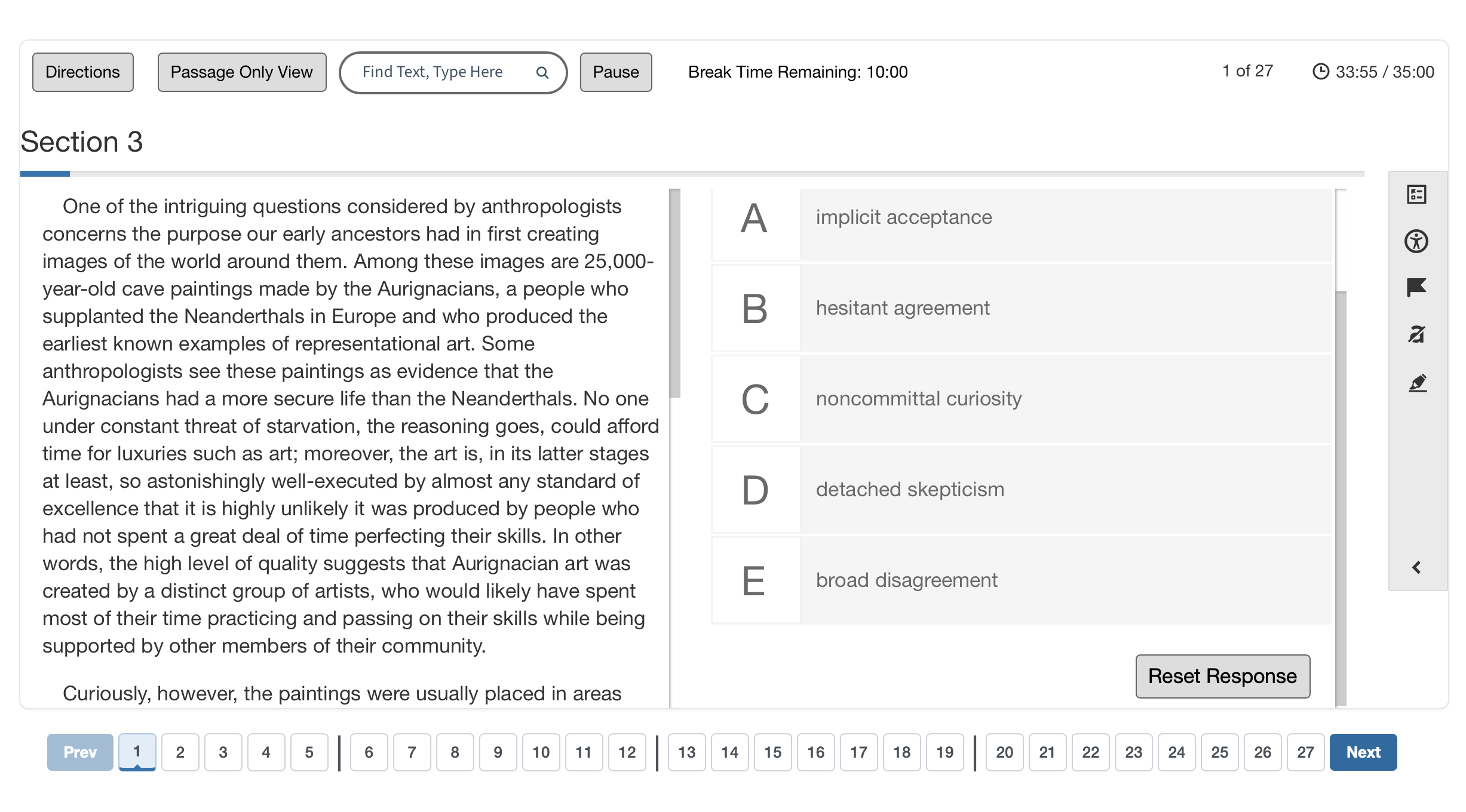
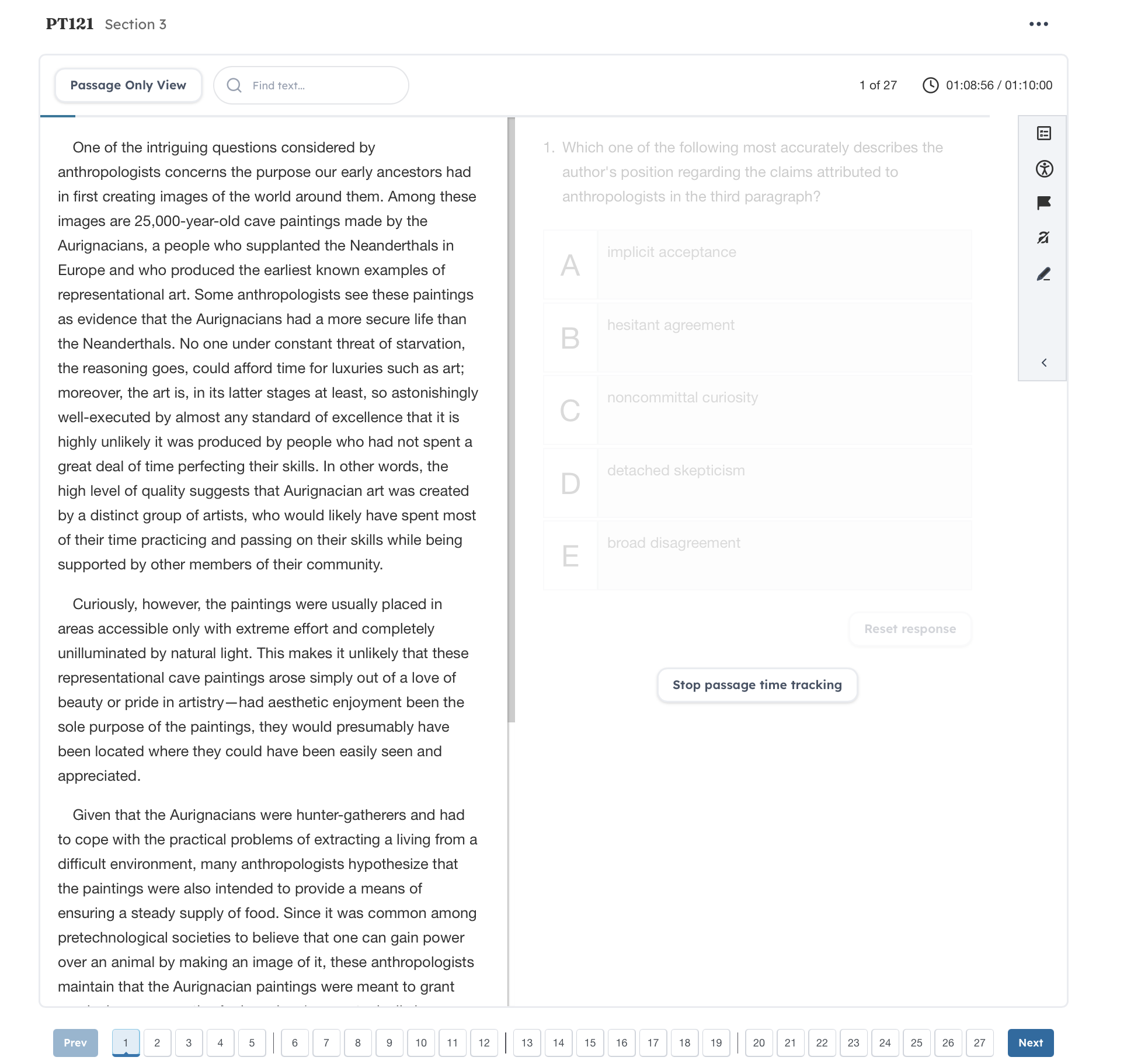
@latome19 I took the August lsat and from my memory the actual test resembled more the top one than the one on the bottom. My passages were not as narrow and long as they are in the bottom image.
Is this just a bug?
@DaisukeKaga Hi there, sorry for the issue. This feature will be coming back soon!
I've been using the digital tester, it looks exactly like how it was on the real day! I haven't had any issues with glitches and things are running super smoothly (I'm using a Macbook Air + Chrome)! Thank you for staying up to date for all of us and remaining our advocates! FYI for everyone who doesn't understand all of the changes -- these are the changes that were rolled out earlier this summer by LSAC! It is imperative to become accustomed to the new interface to best prepare for test day.
We've come a long way since the classic 7Sage days!!
Yeah when I took the official August LSAT at a Prometric center, I had to keep resizing the font on every new section (each LR/RC). It would reset to 125% zoom by default, and I had to keep shrinking it to 100% so the questions with wordy ACs would all fit on the screen at once instead of having to scroll. Not sure if LawHub detects screen/monitor dimensions and chose 125% for default or what.
This is not specifically about the look/feel of the LawHub platform, but related to integration: is there a way to blind review a PT done on LawHub so it can be added into my analytics for blind review? (I could also re-take the PT as a fresh test untimed and then exclude it from analytics, but it is a bit messier).
Looks like the "hide time" functionality was discarded as well. When I click the time, nothing happens.
@deji Are you saying in our tester clicking the hide time functionality doesn't hide the time? Or on test day you experienced this?
When I go to do a drill or a section and click an answer, it doesnt highlight which AC I have chosen. If I pick AC A for example, there is nothing on the screen to show I have picked A, and when I use the elimination feature, there is nothing to show what I have eliminated. Is this happening to anyone else??
@DistinctZealousHealth I'm sorry for the trouble! I've reached out to you via email to help resolve the issue. Please let me know if you didn't receive it. Thanks!
[This comment was deleted.]
@JTF2005 Use the 3 dot menu to the top right to submit drill. Completing a drill is something we'll make easier to do.
I like that it does not stretch across the entire window now, I can finally run in full screen again
Not your guys' fault of course but this thing just keeps getting uglier and uglier
Did you all happen to hear back on the font size holding across sections once it's set in the first section?
Is the default size for LSAC still 125%? Just confirming there have been no changes to this since I still have to select 125% when doing practice on 7Sage.
@ShoddyLawyer After you change font size, doesn't it stay the same font size in your next drill? Or do you have to change it every time?
oh my! I cant see anything.
my screen is purple
@PhillyRed19 Hi there, did you change your color scheme to black on violet? You should be able to change it back to the default via the accessibility button.
When I go to review, I can see that I got the question right or wrong (eg. green or red circle), but the new interface does not display which answer I selected, and which answer is the correct one. I am using Safari. Not sure if it is a #bug or I'm just doing something silly lol
@Amelia_D Did you click "Show correct"? Or are you referring to the list of questions in the chart on review? Here you can see what you picked in red:
Thanks
I could be totally missing it but are the PT, section, and questions #s anywhere on the screen when reviewing questions? I can't find it anymore
@SillyCatLuvr Sorry, this is coming back!
@strawberryicecream Yes, this will be back!