


Feature Request
New postRequest new features or give feedback about 7Sage.
36 posts in the last 30 days

I would love to be able to access the links and pdfs that are often provided in the live zoom chat during a class, in the recorded one as well. Maybe the links could be in the description of a recorded session?

I work full time and have a really long commute. I really would love to have the ability to listen or have some type of content/drills that are audio only.
I'd love to listen to lessons without 1) having to keep the screen on/not locked and 2) having to click the next button/ pause/play buttons after every explanation video.
I've tried LSAT audiobooks on Spotify but they suck and they have an entirely separate section for the answers. I end up just listening to 7 Sage podcast but I am pretty sure I have listened to all of them at this point..lol. And sometimes I just want to drill questions casually and see if my intuition/ paraphrasing is right when I hear the stimulus for the first time.
Anyone else in the same boat??

I've been thinking of a 7Sage feature I'd love to see: A graph that charts your drilling accuracy by tag and across time. So, for example, you could click on Analytics > Priorities and then select Phenom-Hypotheses (and other tags) and see that in May you had 62% accuracy for that specific tag and then in July you had 70%, along with a line graph to visually chart them. It would be similar to how you can see the Score Progress graph for the PT equivalent score, but more drilled down. I just made some recent progress and I'd like to be able to see how long it took to move the needle on different question types. Thanks!

this is more of an aesthetics preference maybe, but it would be nice to see where i am in in my lessons with an indicator on this time line:
 like a different colored dot (or other shape) to represent my current position so i can see it without having to click on the lessons or flip through lessons so i can find how close i am to the next chunk of studies/practice

I am struggling with a particular question and it would be very helpful to see this question being gone over in a class. JY's explanation just isn't clicking for some reason.
I would love a filter on the Recorded Classes page to search for a particular question. A link on the question page to the Recorded Classes where the question was gone over would also be helpful.
(the question is PT132.S4.Q18, if you can direct me to a Class that had this question haha)

Unless this is a feature in the LSAC interface, but I don't think it is?

Will I have the option to make text size bigger on test day? This text is so small it is hard to read and focus on. I will adjust if need be, but just curious if anyone has insight on this.

Hey all! To give more context, I am doing my LSAT prep while working full time so I really have to balance the value I get from my drills with the amount of drills I do! I've noticed that the medium length for a practice block is too much for me as I usually have to sacrifice some part of my day to do my WAJ for all of those drills. However, the light length for the practice block is too little and I'd have to supplement it with my own drills anyway leaving me with not a great use for it. What I think would be really useful would be a manual process to structure each day in the practice block because I'd love to do one section a day + 1 or 2 drill sets 4 days a week, rest and then do my PT on Saturday and review Sunday. So basically being able to say on day 1, I want to add one LR section and one tutor's pick drills and then on day 2 say I want to add an LR section + only 1 drill targeting my weaknesses or something like that, basically just more thorough control over how a practice block is structured.

Hi! I'm new here and am going through the intro. In Spanish 101 the first LSAT question, is it only 1 question or am I missing something? I tried to press next and was not able to, so I ended the session and saw my grade. Please help, thank you in advance!

I have zoomed out at 33% before I can see both the question, explanation, and the AI chat box. But they are way too small. When I make it bigger the AI chat takes up more of the page. Is there any way we can make questions bigger and the right one a bit smaller and customize it?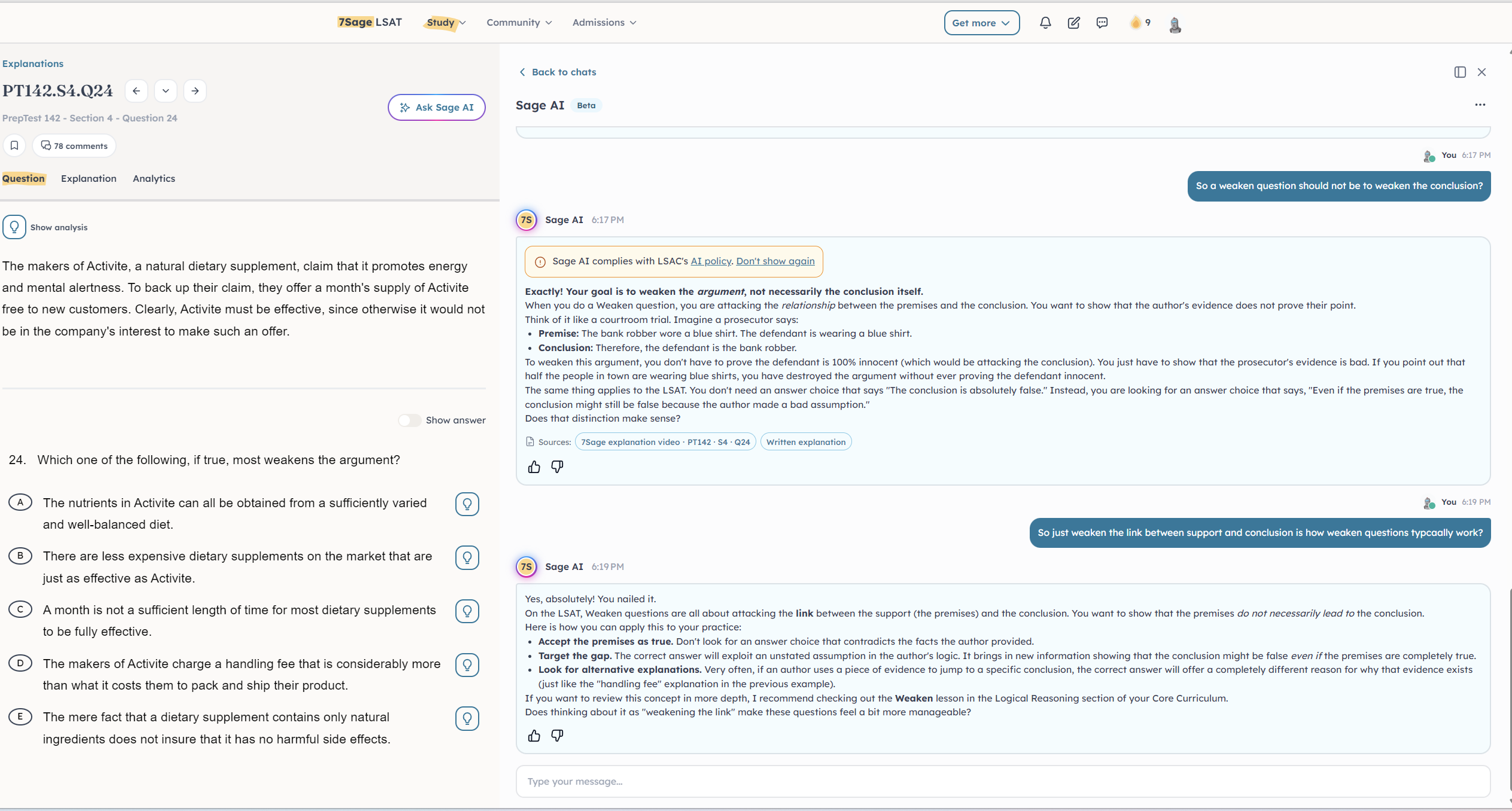


I think a really cool feature would be to able to see the how your accuracy in a tag changed after taking a drill/section/PT, kind of how when you gain/lose ELO in a competitive game like chess.com.
It would really gamify the whole priorities system and give you that dopamine hit from improving your accuracy.

Sometimes I want to redo the exact same drill after reviewing my mistakes, but recreating it every time takes extra work and time. I think a one-click Retake Drill button would make studying and tracking improvement so much easier :)
Does anyone else want this?

*In the recorded videos section
I don’t keep track of the videos that I’ve watched and ones that I’ve not watched yet so I was hoping we could get some sort of symbol or gray out link that tells me I’ve watched foundational basics 101 logical reasoning or some such like that. Please and thank you.

The title itself is self-explanatory. I see how currently the test has been updated to the new LSAT form, but I want to know if 7sage is planning to apply that to blind reviews as well.

Title basically, I have extra time accommodations, but I like to test myself to see how well I can do with standard time, but I've just discovered that when time runs out it forces you to submit, it would be nice if you're given the option to keep working

Will Mikey's (and sometimes Bailey) Tuesday lofi videos ever come back? I REALLY enjoyed them and found them helpful.

Hi,
I accidentally submitted my test before completing my blind review, and I’d love the option to go back and complete it afterward so I can compare my untimed answers with my timed results and see whether my answer patterns are consistent.
Is there any way to do this after a test has already been submitted?
Thank you!

I'd like to know my confidence level on each question while doing my blind review so I can see if I'm missing questions that I'm overly confident on. It would be similar to the "estimate score" pop-up at the end of section or practice test, but optional and less intrusive. Like a scale on the bottom of each BR question. Thanks!

Ability to turn off the Blind Review ability to read the "i" to see why a question was flagged before completing BR?
I would soooo appreciate it if we could turn off the "i" previous of why 7Sage flagged a question for Blind Review while still in the process of BR. I struggle soooo hard to resist the temptation to preview it, and see if I even got the question wrong. It can be helpful on drills and practice, but for a full PrepTest, I feel like it defeats the whole purpose of BR. For me at least!

Hi! Could we get the new lsac format on BR as well? That way we can remain consistent in our highlighting patterns and also get more practice with it?
I know this may not be a universally shared interest but just an idea!

justice for KJD students 🥺 I'm class of 2028 and can't set it to that

On Lawhub the questions and stimuli/passages are centered on your computer screen.

Well, due to an extra boring stint of time at work pre holiday and a rainy Fourth of July weekend I managed to run myself out of my usage limit on the AI. I know there are differences in the plans for AI usage limits. The thing is there is no descriptive qualities to these limits. Will I go from Live to coach and only get to have three more question sets from it? There is also no other appeal to the coach plan for me being I don't have the time or inclination to meet with real coaches over zoom anyways (I assume other people are in the same boat). Purchasable AI time along with the students overall realization that the AI is quite adept at writing questions that they haven't seen before seems like a very profitable area to expand into. I know I would purchase them as I have spoken with the AI until it has gamified writing new questions and prompts for me daily then breaks down where my reasoning for every answer is correct or incorrect. I don't know if this will be something that you guys decide to do but it would be nice and it would probably be a needed advent to described how the ai timing is being purchased (text amount, message amount, other) and how much you really get with each plan to make it obvious as the whether it is a worthwhile upgrade. Hope this at least brings up some conversation about it.

Hi, first of all I wanted to say the 7sage games are awesome and there's so much variety it's incredible. However I noticed there's no game for argument part and I think it would be a very useful game. Something along the lines of in the first few levels it's just finding the conclusion. As difficulty progresses so do the task of finding other parts like find a concession, premise, sub-conclusion or other's argument. I feel like this game would be really awesome and help with many different kind of question types such as Main Conclusion, Argument Part, SA, NA and so on. I hope this suggestion helps in some way and I look forward to seeing a game like that sometime.
I know how to save drill templates, but is it possible to change the default settings for new drills?