


Feature Request
New postRequest new features or give feedback about 7Sage.
35 posts in the last 30 days

Can we get an option to customize our unique robot pic LOL!!! Most of us are on this for months and weeks back to back- and I am not a fan of this pink robot...though it may be growing on me...

the new format expands across the full screen, so for people with large monitors, the whole question looks like one big straight line.

I'd love a watch history for the recorded classes I watch (a la Youtube watch history). I generally can't attend live classes due to my work schedule, so I engage much more with the recorded classes and it can challenging to recall which class I watched and when. Or, even a way to tag classes as 'watched' because I bookmark both classes I've done and classes I would like to come back to. Thanks!

My understanding is that drills have a "share" system intended to allow people to create drills for particularly hard/helpful content, helping people build specific skills outside the built-in difficulty/tags system we can use on our own.
However, I don't think I have ever seen anyone other than 7Sage tutors use the drill link feature, so I was thinking maybe 7Sage could start making their own sets. Maybe they could even be used to "introduce" people to making their own drills.
For example, when preparing for June, I selected all the passages from the PowerScore crystal ball and manually organized them into 4 separate drills based on PowerScore's categories. This was somewhat tedious, and I bet other people did something similar.
In case I have to take August, I'm currently trying to make a drill that focuses on math problems, but I find that the math tag + raising the difficulty isn't really representative of the math questions most folks think are hard. They're tricky questions for sure, but not because of the math.

There are times when I would prefer to do more targeted drills over sections, or a full PT at the end of the week instead of drilling on that last day. It would be great if we had the ability to take out/replace certain suggested activities on the pre-generated practice blocks in our study plan. Thanks!

Hi! Any chance you guys will make a update so we can default to the new interface? I love using the adaptive drill feature but it defaults to the old one. I know June just passed but diving into August I would love if that was an option. Appreciate all you do here!

I know we can bookmark questions to review but I would like the option to add an additional tag to them so I can differentiate WHY I got certain questions wrong, like "Vocab Gap" "Bad Diagraming" or "Illiterate". That way I can better keep track of what I'm doing wrong, since the AI can't tell that I misread a specific word.

Is there a way to see the percentage accuracy of all priorities? If not can we please get this feature? I think it would be super helpful, especially because the top priorities tags change if you change your goal score so it’d be beneficial to see all tags at once. Thanks!

Hi all. I've been supplementing my in program drilling with worksheets/alternative books that share some of the same questions as 7Sage. Rather than filter questions manually when creating a drill and inputting each practice test and scrolling for the question/section, I think it would be helpful to add a shortcut to simply input a PT, Section, and Question # that will add it to the drill. Would greatly streamline the process and make it less time consuming to document external practice within 7Sage. Appreciate the consideration.

I don't know if this is a feature or more of an event. But I'm new to 7Sage and I have really enjoyed the live sessions. That got me to thinking...is it possible the tutors could record themselves completing an entire LR/RC section or PT in a timed situation? I would want to hear their narration but not necessarily their entire explanation of the question and answer choices. I just want to see how the pros do it!!
I also think 7Sage could use this to raise money for a good cause because I would be willing to pay a nominal fee to view. It would even be great if the tutors could challenge each other like a heavyweight fight and see who scores the highest!! I don't know all of the details needed to make that happen but I think others would be excited to view as well. Thoughts??

I've participated in and followed several discussions about making the study plan more dynamic by adjusting for missed days, added study hours, getting ahead of schedule, and other changes along the way.
While thinking about those discussions after taking the June LSAT, I realized there may be another piece we're missing: what happens after test day?
I took my first official LSAT in November 2025. After that, I signed up for 7Sage at the beginning of 2026 and was happy to start from scratch and learn the test from the 7Sage perspective. I loosely followed the study plan, worked through lessons, drills, and PTs, and just took the June 2026 LSAT.
Now I expect I'll likely retake in August or sometime this fall unless I end up with a score far beyond my expectations. Even then, I'd probably still want to see how close to 180 I can get.
So what's the recommended path?
Is there already a feature or recommended workflow that I'm missing? If so, where can I find it?
If the answer is simply changing the test date and continuing the existing plan, I'd like to request something more dynamic that factors in my progress, completed work, remaining curriculum, PT history, and the fact that I'm waiting on a score from a recent official administration.
I was hoping the study plan would acknowledge that the scheduled test date came and went and ask what I'd like to do next.
Am I done with the LSAT? Am I waiting on a score? Am I planning to retake? If so, when?
Based on those answers, the plan could provide recommendations and reconfigure accordingly. Maybe that means finishing unfinished lessons, focusing on weak areas, increasing PT volume, or shifting into a score-maximization mode.
The current plan does a great job getting students to their first scheduled test date. I'd love to see it become dynamic enough to recognize that for many of us, test day is not the end of the journey.

In the previous sections foundations, LR and, RC there is a date next to each day of studying. I noticed when I got to the practice section that is no longer there. See below. The first being the foundations section and second being the practice section.
I like this feature because it helps me keep an overall sense of time and where I am at in my studying journey.


Is there any feature that shows you how much time you spent on studying so far, and like per/by day, so far I can only see the streak, but I would like a feature where I can see how I am doing and how much time I have spent, just as motivation. Visuals would be nice too, like this  but tailored to LSAT/7Sage ofc.

I find tutor responses in the comment sections for specific questions really helpful. It would be great if I had the option to filter to see only those when I got to the comment section.

I think it would be helpful if there were a feature that told us which lesson to review based on our top priorities. For example, let's say next to my top priority question type to review, it would suggest I review a specific lesson.

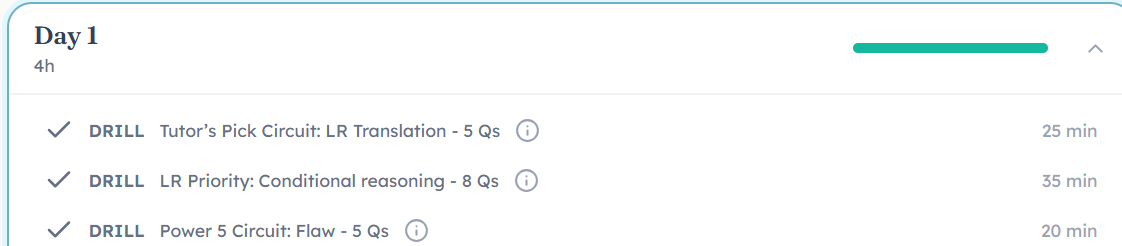
I am working on an LSAT schedule that will allow me to take my practice tests on Saturdays. However with the current features, it seems that you are not able to individualize the practice blocks yourself. Is there a way to add something similar to this? It would be very helpful!

When I'm on normal color scheme, I see buttons (such as to flag/hide and unhide answers) change colors when clicked. However, on an accessible color scheme the buttons are the same color, making it difficult to see whether I am on answer mode or masking mode.
Could this be implemented?

I have a timing accommodation, and it would be really helpful if the Timing column after a drill or section could be adjusted to reflect timing accommodated testing conditions.
Right now, the target times are based only on standard timing. That means I have to manually calculate what the target time would be under my accommodation in order to gauge whether my pacing was actually on track.
A simple solution could be a dropdown within the Timing section that allows users to select their timing conditions. The default could remain standard time, but users could also choose common accommodation settings like 1.5x or 2.0x time.
The selected setting would then automatically adjust the target time, timing feedback, and over/under calculations for the respective activity.
For students testing with timing accommodations, this would make the timing data much more useful and provide a more accurate picture of pacing without requiring our additional calculations.
So for the CAS GPA calculator I'm suppose to put how many units I have for a certain grade type right? But there is a limit to 100 unit per letter grade...?? Which is a problem for me bc my special snowflake school (UCLA) used a quarter system. Yes I can convert, but I can easily end up with fractions once I do. And I just don't understand why there is a cap at 100 units when there are people who got straights A's in undergrad? Or those who double majored?
This is my breakdown:
A+ = 50.5 quarter units
A = 109.5 quarter units
A- = 15.0 quarter units
So luckily only the A+ doesn't divide cleanly for me, but I still think that it's weird to have a 100 unit cap on the calculator. Like, what if all the A+ I got were A's??? Then I'd have no way to use the calculator. But then again I suck at tech so plz lemme know if I used the tool wrong.
Also: Being able to input units ending in .5 fractions would be helpful.

This has been happening for a while now, which makes writing long and comprehensive comments a bit discouraging. I know I can write them in a notepad and paste them into the comments section, but it would be nice to be able to directly write in the comments.
By the way, I would suggest adding a "Bug" topic so that staff can easily go through all the posts bringing up bugs, which should have more priority over feature requests.

Suggestion for Live Class Question Pool Enhancement
I have noticed that in the live classes, we don't really solve questions from the newer PTs which are more representative of the current test. I think it would be an excellent idea to have live classes where the teachers go over the newer questions as well because I feel like there's a difference between questions from PT150+ vs PTs from like the 100-140 range. The older questions are more cookie cutter, less tricky, and have more obvious patterns whereas the questions from the newest PTs are more convoluted and harder to comprehend so I would love to see live classes where the teachers break down those questions for us as well.
Feel free to let me know if I'm missing something. Out of the many live classes I attended, I don't think I have ever seen the teachers give us a question from PT 150+ which is why I wanted to propose this idea. If the reason for not including those is because y'all don't want people who still haven't solved those PTs to be exposed to them via live classes, I get it. Maybe the class labels can say something like "Disclaimer: this class will contain questions from the newest PTs (150+)." I hope this makes sense!

When I was RSVPing for classes, I saw the save to calendar icon and got excited because it's so much easier to check my calendar than to login to 7Sage to remember what classes I want to take. But it's only Outlook. :(
Would love if this feature could be integrated with Google calendar, too!

When a user crosses out three answer choices during their initial pass, leaving only two options open - their selected answer and one remaining contender - the system automatically flags the question as a Split Decision.
This feature assumes the user has Blind Review set to display only incorrect answers. Within that context, if the user has "Auto Split Decision Switch" enabled in their Blind Review preferences, flagged questions will have their selected answer automatically swapped to the remaining open contender when Blind Review loads. No manual interaction required.
Possible preference toggles:
Auto-score the swapped answer immediately and evaluate the Blind Review session score
Hold scoring until the end so the user can work through all other flagged questions before committing
Users who prefer to manually evaluate their split decisions can leave the preference off and encounter the question normally in Blind Review - two answers open, three crossed out.
It would help me because I only use Blind Review to see if the other answer was correct. If there are other answer options open, then I accept that I didn’t evaluate that question as I needed to and need to review it more in-depth later. I still review what was wrong and what was right, but this would eliminate slogging through the section questions and accidentally mis-selecting an intended BR answer - or in the case of a full PrepTest, missing out on swapping the answers from an entire section altogether!
Faster, more accurate question logging begets faster, more accurate question logging begets faster, more accurate question logging begets faster, more accurate question logging....
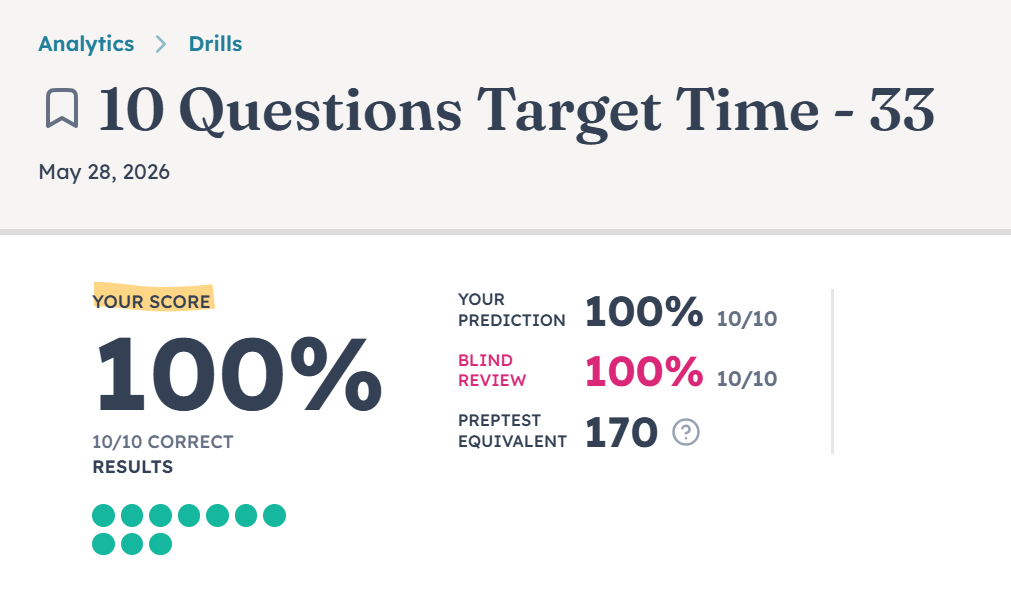
Can we get the PT equivalent for the blind review in drills too? In the image below, we have the PT equivalent for both the timed results and blind review, but that's only because they were the same.
If the blind review were different, it still only shows the PT equivalent for the timed session.
I think this has been asked for before but I also wanted to request a feature to see how one's priorities tag correction percentage increase or decreases or stays stable over time. That way we can see if the practice we do is beneficial in incresing our success for that tag or if we need additional help with those tags to get those questions correct. It's hard to keep in mind what my previous percentages were and see if I am making any progress in my skills without a feature like this. Thanks!